
B2B Email Marketing: Explanation, Best Practices & Examples
Last updated on
by


B2B email marketing is how a business sells to other businesses by email. You collect the email addresses of people who are interested in what you sell. Then you send them emails that build trust, help them make the case to their team, and keep them buying after the first sale.
I write OptinMonster’s newsletter, so B2B email is what I work on every week.
In this guide, I’ll show you how B2B email differs from B2C, 8 best practices to follow, and 3 real B2B emails, including one of ours, with what each one does well.
- What is B2B Email Marketing?
- 8 B2B Email Marketing Best Practices
- 3 B2B Email Marketing Examples
- Drive More Sales With Your B2B Emails
What is B2B Email Marketing?

B2B Email Marketing Definition
B2B email marketing is the type of email marketing companies use to sell products or services to other businesses. You can use it to:
- Educate businesses about how your product or service solves their pain points.
- Establish authority in your field.
- Build long-term relationships with potential customers and clients.
- Persuade leads to make their first purchase from you.
- Onboard new customers and help them succeed.
- Introduce new products, new features, and other product updates.
- Send upselling and cross-selling offers to existing customers.
- Keep long-time customers engaged with your brand.
In short, email lets B2B companies stay in touch with their leads and customers, so they can drive more sales and keep more customers.
Differences Between B2B & B2C Email Marketing
B2C (business-to-consumer) companies sell products and services to individuals, rather than to other businesses. Many of the email marketing strategies you’ll find online are written for B2C.
B2B companies face some key differences when they plan their email marketing:
- Audience: Every email is read by one person. For B2B, though, the reader is usually a business owner or employee reading your message on behalf of their company.
- Decision-Making Process: With B2B emails, your reader usually can’t decide on their own to buy from you. They’ll probably have to pitch your product to their boss, their team, and other decision-makers, and gather data and cost comparisons to do it.
- Sales-Cycle Length: An individual customer may decide to buy over a few days or even a few minutes. A B2B sale can take months because of that longer decision-making process.
- Relationship-Building: B2B companies have to spend more time earning trust before they win a sale. The relationship doesn’t end at the sale, either. If you want to keep your B2B customers, then you have to keep offering support and incentives.
8 B2B Email Marketing Best Practices
1. Build a Great Email List
Every B2B email strategy starts with a list of people who want to hear from you. A big list helps, but the right people matter more: visitors who are interested in your brand, your products, and what you have to say.
People who visit your website have already shown interest in your company, so that’s where to start. That’s the job we built OptinMonster for. It turns website visitors into subscribers with popups, floating bars, fullscreen welcome mats, inline forms, and other onsite campaigns, and you use its targeting rules to decide who sees each campaign and when. These targeting rules include:
- Exit-Intent® Technology: Capture a visitor’s email address before they leave.
- Page-Level Targeting: Show visitors special offers based on the content they’re reading.
- Timed Display and Scroll Triggers: Show your popup only after a visitor has spent a set amount of time on the page or scrolled through part of it.
You can start from one of OptinMonster’s 700+ templates.
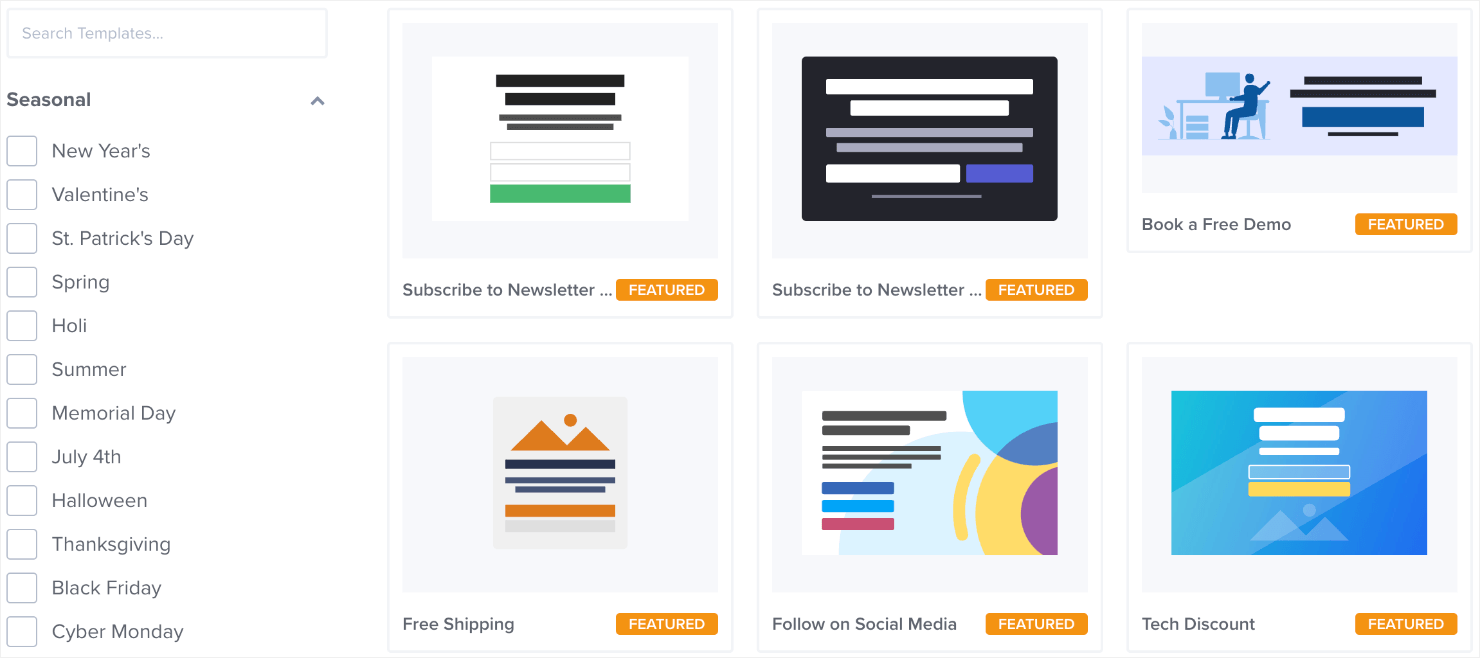
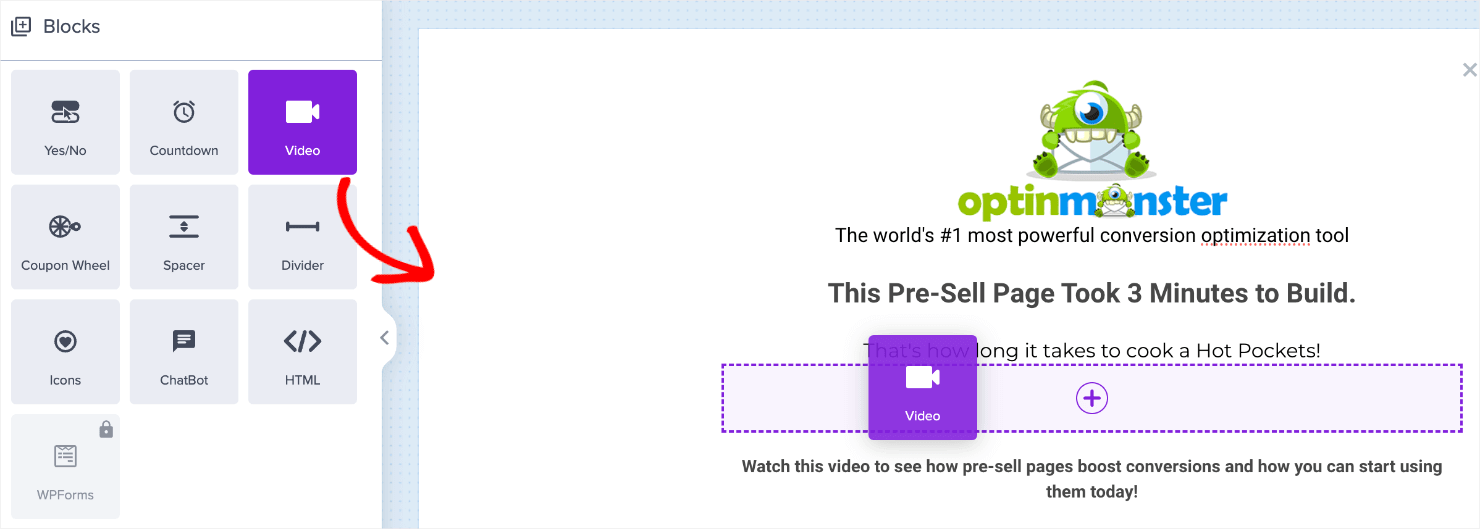
Then you can customize the template in the drag-and-drop builder.
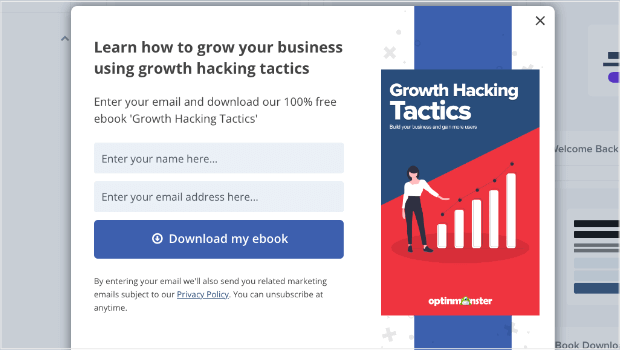
To give B2B visitors a reason to sign up, you can offer a lead magnet. A lead magnet is a free resource, such as an ebook, a checklist, or a PDF guide, that visitors get in exchange for joining your email list. If you have an ebook, then you can start from OptinMonster’s eBook Download template.
Make sure to show each lead magnet only where it fits. With Page-Level Targeting, you can pick the articles and product pages that are closest to its topic.
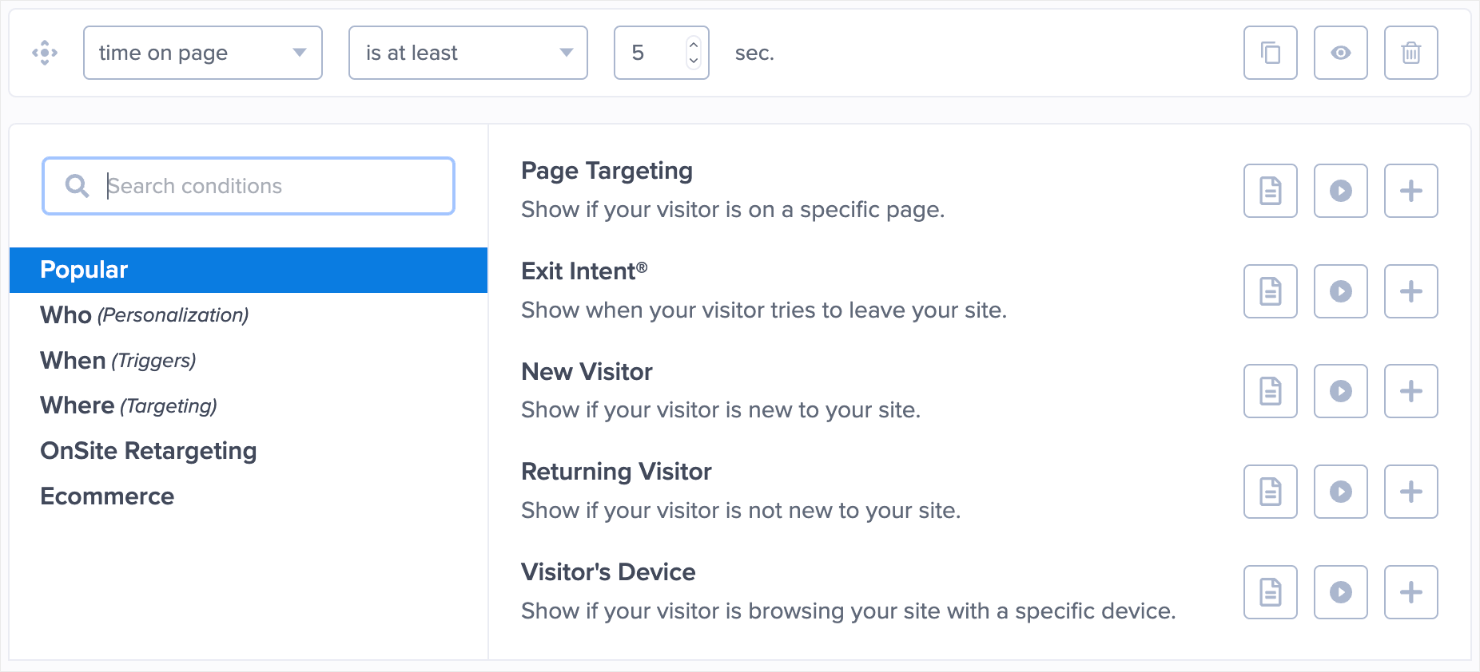 You can also combine Page-Level Targeting with those time and scroll rules in OptinMonster’s Display Rules, for example showing the ebook offer only on related articles once a visitor has scrolled 30% of the page.
So, every lead you collect this way has already told you which topic they care about.
2. Plan Your Email Marketing Sales Funnel & Workflow
Before you start sending emails, you need a plan for every stage of the customer journey. Here are the types of emails to plan first:
- Welcome Email Series: Every new subscriber should get a series of emails that introduces them to your company and to your email newsletter.
- Promotional Emails: Send emails that promote your products and services and give exclusive discounts.
- Onboarding Email Series: Send customers who have just bought your product for the first time a series of emails that teaches them how to use it. This is especially important for SaaS (software as a service) companies.
- Win-Back Emails: When a customer cancels, stops buying, or stops opening your emails, then a re-engagement email can bring some of them back.
You’ll use email automation to send many of these emails. Here’s an example of a basic onboarding workflow for an automated email series:
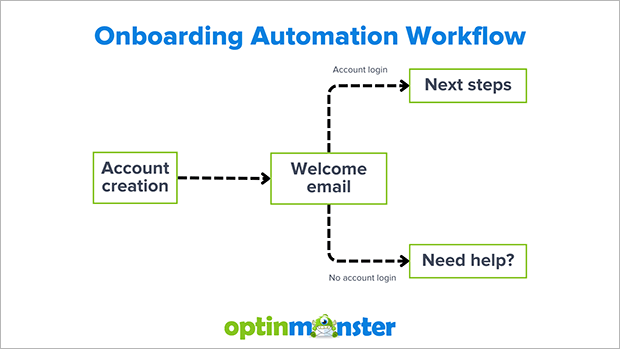
To learn more, see our guide to marketing automation workflow examples.
3. Use Segmentation to Send Targeted Email Campaigns
Once you’ve built your list and mapped out your funnel, the next job is sending the right email campaigns to the right people.
That’s what email list segmentation does. Email segmentation means dividing your email list into smaller groups, called segments. You can segment your list based on data such as:
- Which lead magnet the subscriber signed up for.
- The subscriber’s position in your sales funnel.
- The customer’s purchase history.
- Whether the subscriber has been engaging with your emails.
- The subscriber’s location.
- Demographic information such as age or gender.
With segments, every member of your list gets the most relevant content you have.
Each email service provider (ESP) has its own instructions for segmentation. For example, here is Constant Contact’s guide to creating an audience segment. Often, you create segments with tags that are attached to your contacts.
Whichever email marketing platform you use, the key to sending targeted emails is to collect as much data as you can about your leads.
If you’ve used OptinMonster to build your email list, then you’ve already started. OptinMonster integrates with your email service provider, so the data you gather through your onsite forms goes to your list with each contact.
Here’s an example. Let’s say you have an OptinMonster popup that offers a downloadable lead magnet called “Ultimate Checklist for Starting a Successful YouTube Channel.”
You can automatically tag every contact who signed up for that lead magnet, so you’ll always know they showed interest in building a YouTube channel. When you have products, services, or content about video marketing, then you can send those emails to that segment.
Another OptinMonster template that helps with segmentation is the Exit Survey:

You can customize the questions for your business. Every visitor who fills out the survey tells you why they haven’t bought yet, so you can tag them and send emails that answer that reason.
Learn MoreEmail Segmentation Strategies You Need to Use
4. Craft Attention-Grabbing Subject Lines
With a segmented list and a plan in place, you’re ready to start creating your email campaigns.
The first job is getting subscribers to open your emails, and that’s what a subject line is for. Here are a few of our top tips for effective email subject lines:
- Create a sense of urgency: Words like “Today Only” or “Limited Time Offer” tell readers to open your email right away.
- Preview the value inside your email: Your subscribers expect to get something from your emails. Use your subject line to tell them your email has useful content or an exclusive offer.
- Use strong, powerful words: Bland subject lines are easy to ignore. See our list of power words for help.
- Pique interest with a bit of mystery: Preview the value, but don’t give it all away. A phrase like “Our biggest sale of the year” makes subscribers open your email to learn more.
- Use humor: If it fits your brand voice, then you could crack a joke in your subject line.
Here’s a subject line we used at OptinMonster to announce a new feature to our customers:

The fire emoji and the all-caps “NEW” catch the eye. The subject line also names the feature without explaining how to use it, so subscribers have to open the email to find out.
For more ideas, see our guide to email subject line best practices.
5. Be Personal
I mentioned earlier that B2B email marketing involves more relationship-building than B2C does. That’s because B2B sales generally take more time and trust.
You’re writing to another business, so keep the tone professional. You can still sound like yourself.
Here’s an email we sent to OptinMonster subscribers:

We kept this email personal in a few ways:
- It’s addressed to the subscriber by first name.
- It’s written in the first person.
- The tone is friendly and casual, like writing to a colleague.
- It comes from “Angie at OptinMonster,” so subscribers hear from a specific person rather than a faceless brand.
If you keep your emails personal and friendly, then subscribers are more likely to trust you.
6. Offer Evidence
B2C marketers have to convince potential customers that their product will make them happy, will solve a problem, and is worth the cost. B2B sales are harder to win, because you have to prove that your product makes financial sense for a whole company.
B2C emails often appeal to emotion. B2B emails have to make the business case with facts.
So, you need proof, such as:
- Case studies.
- Reports and white papers.
- Product comparisons.
- Customer testimonials and reviews.
- Awards and recognitions your company has received.
- Infographics and visual data.
- Statistics that show how your product helps customers succeed.
Here’s an example from one of our own B2B emails. It invited subscribers to a free webinar with a live demonstration of OptinMonster. After explaining the webinar, we listed results our customers got with OptinMonster.

We left the sources for these figures out of the email, because we wanted every link in it to go to the webinar registration page (more on that in the next section). Every figure comes from our case studies, though. Make sure every figure you quote is accurate and that you can show where it came from.
Get Started NowJoin OptinMonster risk-free today to drive more traffic, boost conversions, and get more sales.
7. Create Compelling CTAs
In email marketing, a call to action (CTA) is the button or text you want your subscribers to click. Every marketing email should have one primary CTA that moves readers toward the goal of that email. B2B email CTAs often link to:
- A sales page or another landing page.
- The registration page for a webinar or demo.
- A blog post, study, or other piece of content marketing.
Make sure it’s clear exactly where your subscribers should click and why they should click.

You’ll usually want one primary CTA per email, featured at least twice.
For more examples, see our guide to email call-to-action examples.
8. Test, Track, and Make Adjustments
These best practices will help you build your B2B email marketing strategy. Every industry, business, product, and audience is different, though, so expect some trial and error.
As you send your email campaigns, track the important email marketing metrics, such as:
- Open Rate.
- Click-Through Rate.
- Unsubscribe Rate.
- Email Deliverability Rate.
For a benchmark, MailerLite’s 2025 email benchmarks, drawn from over 3.6 million campaigns, put the average open rate at 43.46% and the average click rate at 2.09%. Consulting averaged a 45.96% open rate and a 2.41% click rate, and software and web apps averaged 39.31% and 1.15%.
Keep in mind that Apple Mail Privacy Protection marks emails as opened automatically, so real open rates are lower than your dashboard shows. Your click rate is the more reliable number to track.
You can use A/B testing to see which subject lines, sender names, and CTAs perform best. Then apply what you’ve learned to future campaigns, and over time you’ll see what your audience responds to.
3 Effective B2B Email Marketing Examples
Next, I’ll show you 3 real B2B email campaigns and how each one uses the best practices above, so you can see how to create your own email campaigns.
1. Free Resource Email from Litmus
Here’s the whole email.
Subject Line:

Email Content:
The email starts with a bold heading and CTA, all above the fold. If subscribers already know they want to learn more about Litmus’s email templates, then they can click right away.
Subscribers who scroll through the email will see examples of some of the available templates, along with more details about what’s available. Below that text, there’s another button to view the email templates. This button has different, more specific CTA text, and it gives subscribers another chance to click after they’ve read more.

The main email content ends with a “P.S.” message, a secondary CTA, and a testimonial.

Why and How This Email Works: This email has 1 goal: to send subscribers to Litmus’s email template hub. Every part of the email points subscribers to that CTA, which appears twice.
The subject line is direct and states the value, and the CTAs stand out in the email’s simple layout. To add some proof, the testimonial at the bottom says these templates can cut production time in half.
Users have to create a free Litmus account to get the code for the templates, so this email moves leads through Litmus’s sales funnel. The email also reminds current customers of the product’s value, which helps with customer retention.
2. Onboarding Email from Grammarly Business
This onboarding email goes to new customers on Grammarly’s Business plan.
Subject Line:

Email Content:
The email starts with an animation showing Grammarly’s tools in action.

In the rest of the email, Grammarly shows new customers the ways they can use their Grammarly Business account.

Why and How This Email Works:
The subject line is fun and encouraging. It sets the tone for an email that helps new customers get started.
Most emails should focus on one primary CTA. This onboarding email is an exception, because it gives an overview of Grammarly’s features along with a few options for next steps. Customers can:
- Click the “View Your Settings” button to start customizing various features.
- Download and install the suggested browser extensions and apps.
- Contact the Customer Support team if they need any help.
- Click any of the social media buttons to find more ways to engage.
If you’re building an onboarding email series, then an overview email like this one from Grammarly is a good first send.
3. Webinar Registration Email from OptinMonster
Here’s the whole email.
Subject Line:

Email Content:
The email invites subscribers to a free webinar, with the date and time of the live demonstration, what they’ll learn, and two links to sign up.

Why and How This Email Works:
This email looks very different from the first 2 examples. It’s plain text, with no images, buttons, or formatting. Plain text reads like a note from a person, which suits a B2B email that’s trying to start a conversation.
This email uses many of the best practices I shared above:
- The subject line describes the value inside the email.
- The tone is friendly and personal.
- The email has a single CTA, which appears twice.
- We provide hard data to back up our claims about our product’s value.
Drive More Sales With Your B2B Emails
Most of these best practices depend on having the right people on your list, so start there. In our case study with SnackNation, they used OptinMonster to:
- Add 1,200 new email subscribers each week.
- Bring in 15 to 20 qualified leads each day.
- Convert 31.85% of their abandoning visitors.
Then you can plan what each segment gets, write subject lines worth opening, and give every email one clear CTA.
To put the plan on paper, see our guide to creating an email marketing strategy.
Ready to turn more of your website visitors into B2B leads?
Disclosure: Our content is reader-supported. This means if you click on some of our links, then we may earn a commission. We only recommend products that we believe will add value to our readers.
One response to “B2B Email Marketing: Explanation, Best Practices & Examples”
-
This is a great overview article and gives me what I need to take action in my business. Thanks!

Add a Comment