
Upsell vs Cross Sell: What’s the Difference?
Last updated on
by
TL;DR: Upsell vs Cross Sell
Upselling = Encourage customers to buy a higher-priced or premium version of the same product.
Example: Suggesting a 10-hour photography package instead of a 6-hour one.
Cross-selling = Recommend complementary products that enhance the original purchase.
Example: Offering photo albums or prints along with a photography package.
Main Difference: Upselling increases value by upgrading, while cross-selling increases value by adding related items.
If you sell online or run a SaaS business, then you’ll often need to choose between two offers for a customer who’s about to buy: an upsell and a cross-sell.
With an upsell, you invite the customer to trade up to a better version of the product they picked. With a cross-sell, you suggest a second product that goes with the first one.
I’ll show you examples of upselling and cross-selling, when to use each strategy, and how to plan and run them on your own website.
What is Upselling?
Upselling is when you encourage a customer to upgrade what they’re buying to a bigger or better version. You aren’t adding a second product, just offering a premium version of the one they’ve already picked.
Upselling Examples
eCommerce Upsell: Imagine an online store selling pet food. An upsell could simply be a larger size bag. This would improve the customer experience because they wouldn’t have to reorder as quickly.
Some pet stores also add a discount and a deadline. In the checkout below, a banner offers the customer an upgrade at 30% off, for that day only:
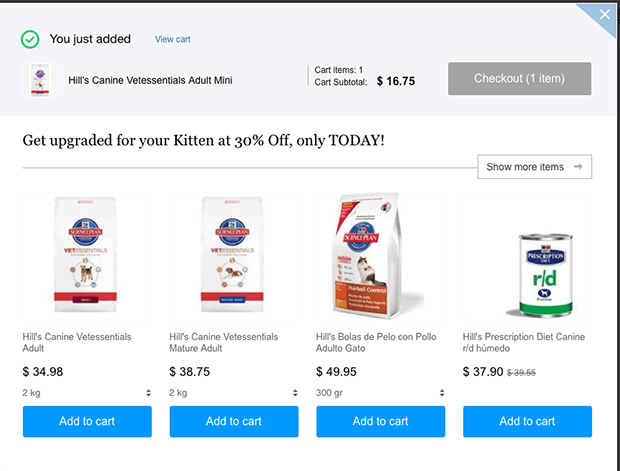
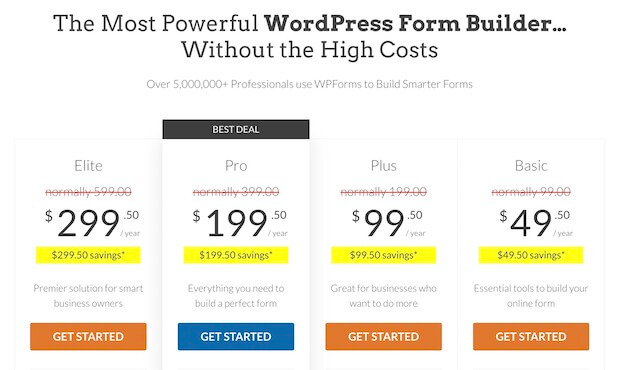
SaaS Upsell: Software sold in plan tiers can recommend the next plan up, with more features for a slightly higher price.
You can see this on pricing pages like the one from WPForms:
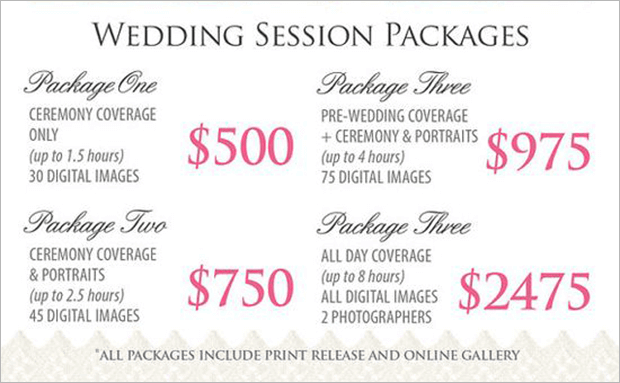
Service Upsell: For service providers, you could add on more time or deliverables to the package, or use more premium materials.
Upselling examples for services might include:
- A 10-hour wedding photography package instead of a 6-hour package
- Creating 5 social media posts for your client per week instead of just 3
- Using premium synthetic oil for an oil change instead of conventional oil
For more ideas, see our guide on upselling tips and examples.
What is Cross Selling?
Cross-selling is when you recommend products that go with the one your customer is already buying. You can offer them separately or as a bundle at a lower price than buying each item on its own.
Cross Selling Examples
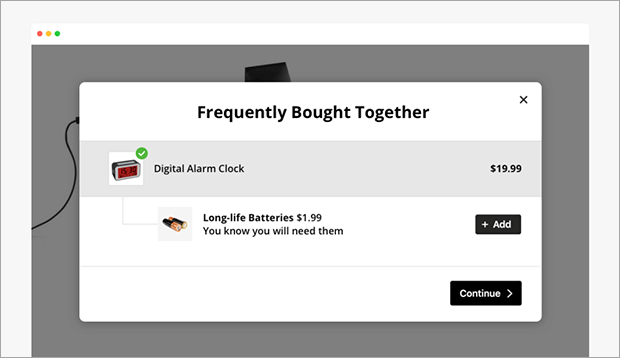
eCommerce Cross-Sell: Amazon put a Frequently Bought Together section on most of their product pages, and you can use the same pattern in an online store of any size.
Here are a few cross-selling examples for eCommerce businesses:
- Adding paper and toner to a printer purchase
- Recommending accessories for a purchased outfit
- Offering matching throw pillows for a sofa or chair
If you sell on Shopify, then our guide on how to cross-sell on Shopify shows you how to set up your own recommendations.
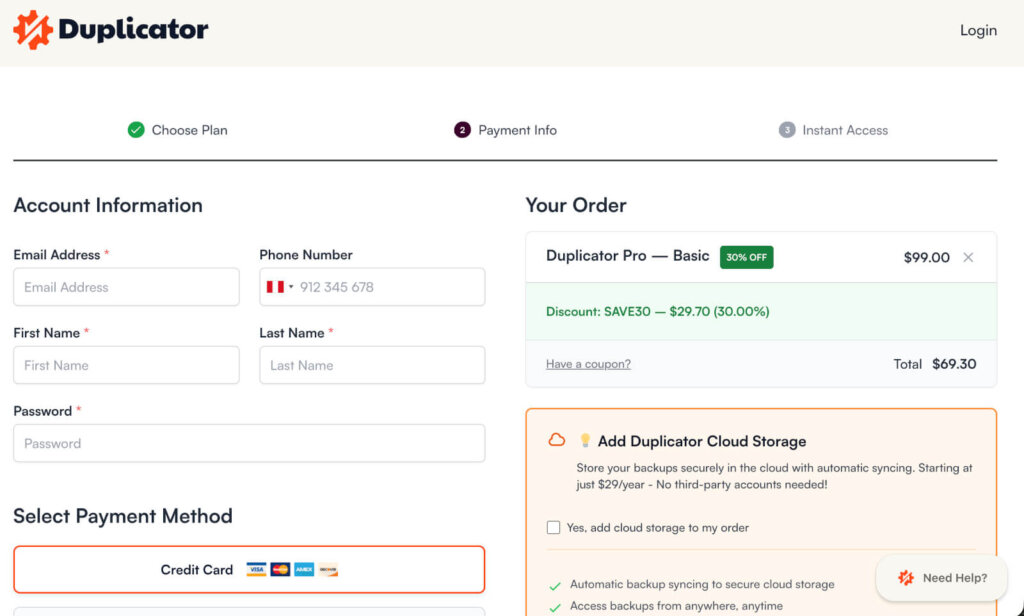
SaaS Cross-Sell: Software companies that sell more than one product can offer a second product at checkout, while the customer is already paying.
For example, on the Duplicator checkout page, they offer a cross-sell option for their backup cloud storage:
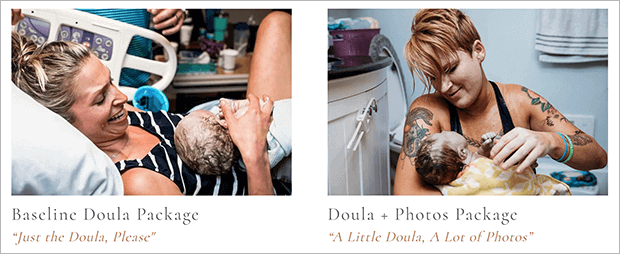
Service Cross-Sell: Service providers could add on a related service package.
For example, a birth doula could cross-sell a photography service to a client who books doula support.
Difference Between Upselling and Cross Selling
Upsells and cross-sells are both popular eCommerce optimization techniques for increasing how much each customer spends.
In the table below, I’ll compare the two on what the customer buys, the price, and when you should make the offer.
| Compared on | Upselling | Cross-selling |
|---|---|---|
| What the customer buys | A bigger or better version of the product they chose | A second product that goes with the first one |
| Goal | Raise the value of one product sale | Add more items to the same order |
| Price compared to the original | Higher than the version they picked | Usually lower than the original product |
| Best timing | While the customer is still choosing, or later as an upgrade | Once the customer has chosen the main product, in the cart, at checkout, or after the purchase |
| Typical placement | Pricing pages, product pages, and checkout | Cart pages, checkout, post-purchase pages, and follow-up emails |
| Example | A larger bag of the pet food the customer picked | A case added to the order with a new phone |
Imagine a restaurant selling food.
Upselling would be encouraging a customer to order a larger, more expensive version of their meal.
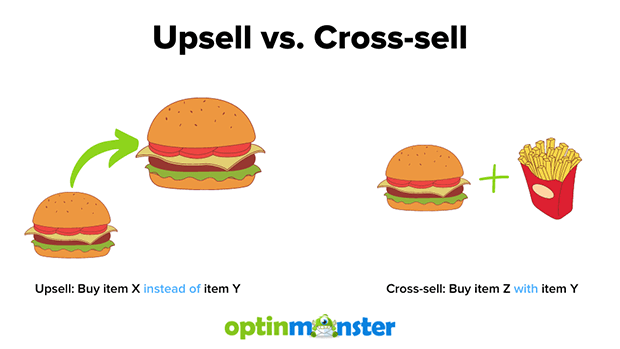
One example might be a double hamburger loaded with cheese and toppings instead of a single burger without cheese.
The main entree is still the same. But the customer gets more of that entree.
Cross-selling, on the other hand, might be asking the customer if they want to add a side, beverage, or dessert to their meal. The main entree stays the same, but the customer gets more items in their meal.
When to Use Upselling
I’d only recommend making an upsell offer when all three of these are true:
- You have a bigger version to sell. Plans or packages of different sizes give the customer somewhere to move up to, like the plans on our own pricing page.
- It costs you only a little extra to deliver. For example, if you have software features already built or an extra hour of photography when you’re already at the venue.
- It solves a problem the buyer already has. If the bigger version only adds things they won’t use, then skip the offer.
You can make the offer at three points:
- Before the sale: Offer the upgrade while the customer is still choosing what to buy. For example, a wedding photographer could offer two extra hours of photos at a lower price while the couple is still picking a package.
- At checkout: Offer the upgrade just before the customer pays. We once did this on our own checkout page, where people buying our Basic or Plus plan saw a small box suggesting the Pro plan instead. Pro includes Exit-Intent®, which shows your popup just as a visitor is about to leave your website.
- After the sale: Offer the upgrade once the customer has outgrown what they bought. OptinMonster plans work this way because if your campaigns get more views in a month than your plan includes, we move you up to the next plan automatically.
Where upselling goes wrong: An upsell backfires when it pushes someone into more than they need. A customer who regrets the purchase may ask for a refund, and they might stop trusting your recommendations.
When to Use Cross Selling
Cross-selling can happen in the cart or after the purchase.
Either way, I’d check every cross-sell offer against these three rules:
- The product is clearly related to what they’re buying. Paper and toner go with a printer, but a bestseller from a different category doesn’t.
- The price feels small next to the original product. Customers already have an idea of how much they want to spend, based on the price of what they picked. A laptop dock still works as a cross-sell because it costs much less than the laptop.
- The offer matches the customer. Base it on what’s in their cart or what they’ve bought from you before.
Then choose where to show each offer:
- In the cart or at checkout: Show two or three low-priced add-ons at most, so you don’t slow the customer down.
- After the purchase: Save pricier items for a post-purchase page or a follow-up email.
Where cross-selling goes wrong: If you show too many offers or add extra steps to checkout, then the customer may leave without buying anything. Recommending products that don’t fit hurts, too. At best, you’ll look like you don’t care about your customers, and at worst, you’ll look greedy and untrustworthy.
How to Upsell and Cross Sell
Upselling and cross-selling can both raise your average order value (AOV) and your customer lifetime value.
Here are the four steps I’d follow to set them up for your own business.
1. Get to Know Your Customer Base
I’d start with your existing sales data, so you can see what customers are already buying in the same order. Maybe there’s a particular customer persona or demographic that’s more likely to go for upsells.
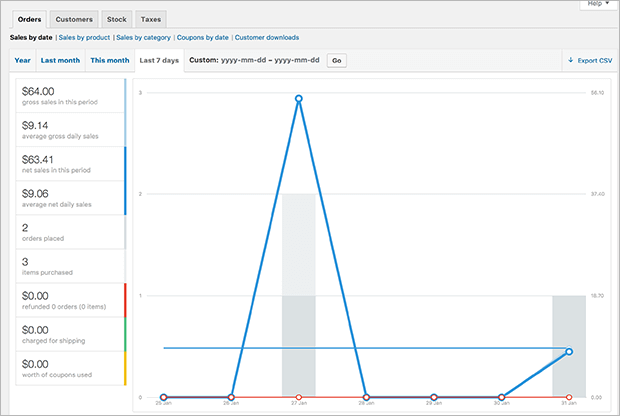
You can also interview customers directly about what went into their decision-making process. Ask current customers what would make their experience with a product better.
Repeat customers can provide insight about what maintains customer loyalty. And customers who don’t buy can still tell you useful information about why they didn’t make a purchase.
2. Map the Customer Journey
With this data, you can create a customer journey map.
Try to answer questions like:
- What do customers already have when they come to my business?
- What results do they want?
- What are all the steps and decisions along the way?
- Where do customers run into obstacles, and what do those obstacles cost them?
- Where do they get information about the problem we solve?
- Whose opinion do they trust when it comes to this problem and possible solutions?
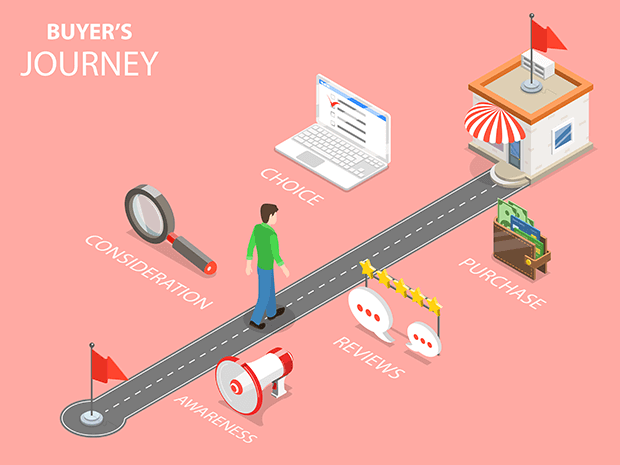
When your map is finished, make sure to mark each point where a customer gets a result they wanted, such as their first order arriving.
3. Identify Products That Solve Problems
The points where a customer gets a result are good places to make an upsell or cross-sell offer. That’s because at that moment in the customer journey, your customers are happy and have seen some value in your offers.
Once you identify those points, you can look for the new problem the customer has at each one. So, any products or offers you already sell that solve those problems would be valuable upsells or cross-sells.
For example, a couple is usually happy on the day their wedding photographer delivers the photos. But their next problem is how to display and share those photos.
So, delivery day is a good moment to offer the couple a printed album.
4. Set Up Your Upselling and Cross-Selling Techniques
B2B sales might rely on your salespeople selling upgrades or add-ons personally based on the customer relationships they’ve established. On the other hand, service providers might be able to upsell a warranty or other upgrade at the point of sale.
Because their checkout is online, eCommerce and SaaS businesses can more easily automate upsell and cross-sell offers. You can show these offers through in-cart upsell popups, at checkout, or on a post-purchase page.
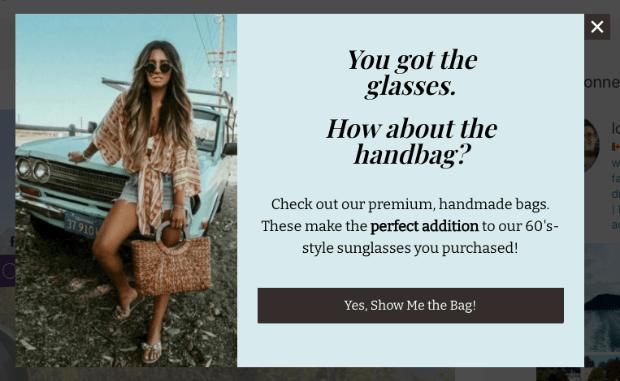
You can also make an offer after the order is placed, on a post-purchase page or in a follow-up email. For example, someone who bought a bike could get an email a month later offering maintenance products.
We’ve done this on our own site too, with an upsell on the post-purchase page after a paid order.
Keep in mind that a post-purchase sale becomes a second order, so it won’t show up in the first order’s value.
Whatever system you set up, make sure you gather data consistently to see how well your strategies are working. If your average order value isn’t going up, then you may need to adjust your offers.
How to Use Popups to Upsell and Cross-Sell
A popup lets you show an upsell or cross-sell on the exact page where it fits, to the shoppers it fits, without changing your checkout. That’s the job we built OptinMonster for.
Here’s where I’d use each type of campaign:
- A slide-in on your pricing or product page. A slide-in sits at the bottom of the screen while visitors compare options, so you can point them to the bigger plan or package without covering the page. We used a slide-in like this to suggest an upgrade on our own checkout.
- An in-cart popup for add-ons. OptinMonster can show a popup only to shoppers with a certain product in their cart, so someone buying a printer sees toner and nobody else does. The same popup can skip shoppers who’ve already added the item. Here’s how to set up an in-cart upsell popup.
- A floating bar for free shipping. A bar that tells shoppers how much more to spend for free shipping nudges them to add one more item, whatever they’re buying. Here’s our guide on adding a free shipping bar to your store.
- An exit-intent popup for shoppers about to leave. Exit-Intent® spots when a visitor is about to leave the page, so you can offer a bundle before they go. Our guide on creating a WooCommerce checkout page popup walks through it.
- A thank-you popup after the purchase. Once the order is placed, you can show a related product or the next upgrade on the confirmation page. Here’s how to create a thank-you popup.
I’d start with one of these on the page where your customers already make their buying decision, then add the next once the first one is working.
Want your first upsell or cross-sell campaign built for you?
Our conversion experts will design 1 free campaign for you.
Which is Better, Upsell vs Cross Sell?
You’ll usually get more from an upsell before the customer has settled on the product they want, and more from a cross-sell after they already have.
If a customer is still comparing plans or models, then you could show them the premium version. If they’ve already put the item in their cart, then you could suggest something that goes with it.
But there is no one-size-fits-all answer for which strategy suits your business.
An upsell only makes sense if you have a premium version to sell. A cross-sell only makes sense if you sell a smaller related item.
I recommend making one offer at a time. Upsell while they’re still choosing which version to buy, and cross-sell once they’ve picked it. If you show an upgrade and an add-on on the same screen, then you’re asking the customer to make two decisions at once.
Upsell vs Cross-Sell FAQs
What does upsell vs cross-sell mean?
Upsell vs cross-sell is the choice between two ways to raise the value of an order.
An upsell offers the customer a better or more expensive version of what they’re buying, like a higher-tier software plan instead of the starter plan. A cross-sell offers an extra item that goes with it, like a case for a new phone.
Is cross-selling good or bad?
Cross-selling is good for the customer when it saves them a second trip, like batteries offered beside a toy that needs them.
A simple test is whether you would mention the item if a friend were buying from you in person. If you wouldn’t, then you may want to leave that offer out.
What are the disadvantages of cross-selling?
The main disadvantages of cross-selling are lost trust and lost sales.
Customers may stop trusting a store that pushes unrelated add-ons. And an extra offer between the cart and the payment step can give them one more reason to leave before they pay.
Get Started With Upselling and Cross-Selling
Ready to try an upsell or cross-sell on your own website? Get started with OptinMonster today.
For more ideas, see our guide on how to increase conversion rates across your website.
Disclosure: Our content is reader-supported. This means if you click on some of our links, then we may earn a commission. We only recommend products that we believe will add value to our readers.
Add a Comment