
Holiday Marketing Campaigns: A Month-by-Month Plan for 2026
Last updated on
by
TL;DR
A holiday marketing campaign is an offer, a popup, or an email linked to one date on the shopping calendar. This guide covers the year-end season, which runs roughly from Halloween to the New Year sales, and each date works best with a different kind of campaign.
It starts with the list you build in October, runs through Black Friday, Cyber Monday, Giving Tuesday, and the December shipping cutoffs, and ends with the January sale.
Are you planning your holiday marketing around one Black Friday discount? The holiday season has nine important sales dates, but each one works best with a different campaign.
The holiday season is the one time of year when your visitors arrive already planning to buy. So, your job is making sure they shop with you, come back for the next date on the calendar, and leave you with an email list that keeps customers coming back.
In this guide, I’ll walk you through the year-end season one holiday at a time, from the list you build in October to the sales you can still make in January. For each date, I’ll name the campaign I’d suggest running on your website and help you set it up.
Your 2026 Holiday Marketing Calendar at a Glance
Each of these campaigns should contain four parts: the offer itself, the email to your list, a post on social media, and the campaign on your own website.
Here are the dates that matter for 2026 and the campaign I’d build for each:
| Date | Holiday | The campaign to run |
|---|---|---|
| October 1 to 31 | Halloween and the list-building window | Early-access signup popup or a coupon wheel |
| November 26 | Thanksgiving | A scheduled floating bar teasing the sale to subscribers |
| November 27 | Black Friday | A countdown to a real deadline |
| November 28 | Small Business Saturday | A local offer shown only to local shoppers |
| November 30 | Cyber Monday | A second offer for the people who didn’t buy on Friday |
| December 1 | Giving Tuesday | A donation ask with no coupon attached |
| Early to mid December | Gift guides and shipping cutoffs | A gift-guide popup and a shipping-cutoff bar |
| The week before December 25 | Last-minute shoppers | An exit-intent popup for the shoppers about to leave |
| December 26 to January | After Christmas and New Year | A returning-visitor campaign and a win-back email |
The dates move a little every year, and there are plenty of smaller ones I’ve left out.
For full details, see our ecommerce holiday sales calendar, which lists every shopping date in the year with ideas for each one.
Before any of these dates arrive, make sure the website itself is ready for the traffic. Our guide on getting your site ready for the holiday ecommerce season covers speed, mobile, and site search.
October – Halloween and the List-Building Window
Your email list is the one channel you own. Ads cost more in November and social posts reach fewer people when every brand is posting, but an email to your list is free and reaches everyone on it.
So, build the list first, and start as early as you can. Mid-October is the latest I’d start.
The offer: The simplest version is an early-access signup. This is a popup on your busiest pages that offers first access to your Black Friday deals in exchange for an email address. You can add a gift guide, a wishlist download, or a small welcome discount, but hearing about the deals first is often enough on its own.
The email and social post: You don’t have a holiday list yet, so this month the message goes out where you already have an audience. Tell your social followers and current subscribers that early access to the sale is coming, and where to sign up for it.
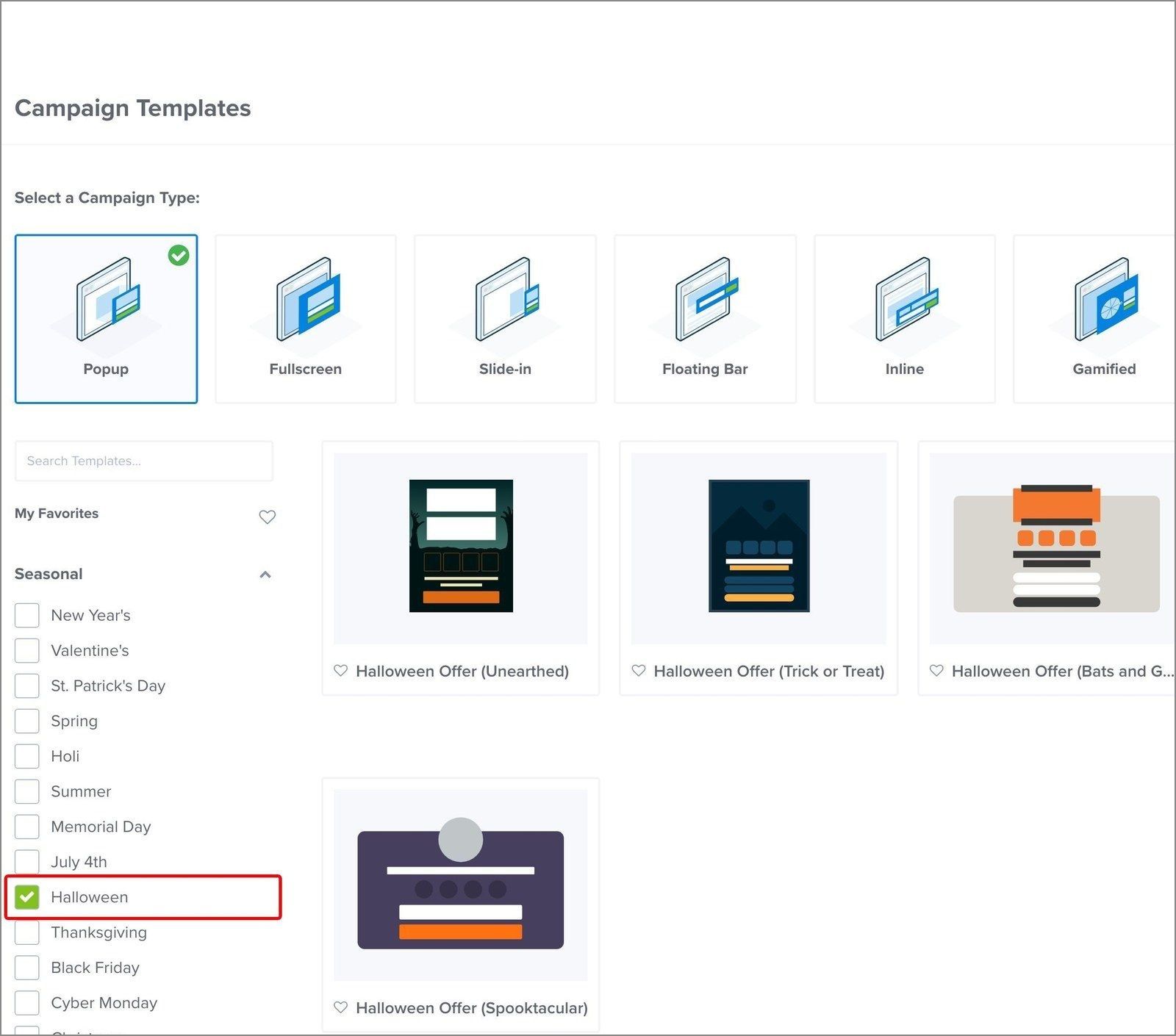
On your website: In OptinMonster, filter the template library by season and start from a Halloween design instead of a blank page.
If you want the signup process to feel more engaging, then a coupon wheel also works well in October. The visitor spins for a prize, and you set the odds and the coupon for every slice yourself.
One of our customers built their holiday campaigns this way. Cloudways’ holiday campaigns grew their overall list by 229%, which led to a 120% increase in free trials.
For more details, see our Halloween popup ideas.
Thanksgiving Week – Tease the Sale to Your Subscribers
Thanksgiving is November 26 this year. During the week before, you need to keep the early-access promise you made in October.
The offer: Show your subscribers the offer, the opening time, and the closing date before anyone else sees them.
The email: Make sure to also send the same teaser to your list by email, because it’s probably the first holiday email your subscribers will open. For help with this, see our holiday email templates and examples.
If you announce the sale on social media too, then our guide on creating a social media holiday strategy covers the posting schedule.
On your website: that teaser works well as a floating bar across the top or bottom of the page with the offer and the date it opens.
I’d build it now and schedule it in advance, so it appears on the day you choose and stops running when the sale opens. That way you’re not logging in to switch campaigns on during your busiest week.

In OptinMonster, you can set the start and end using the Scheduling button on the Publish screen. You can learn more about how to schedule OptinMonster campaigns.
Black Friday – Countdown to a Real Deadline
Black Friday is November 27, but the work for it should start in early October.
For the full timeline, see our guide on how to prepare for Black Friday and Cyber Monday, and for the deals themselves, I recommend reading our Black Friday marketing ideas.
The offer and the email: A Black Friday campaign has three parts: the deal, the announcement email to your list on the morning the sale opens, and a countdown on your website.
On your website: Shoppers buy on Black Friday because the offer is about to end, so I recommend making the deadline a real one. If your countdown resets every time someone reloads the page, people notice and stop trusting it. Pick the date the sale ends and count down to that.
Our guide on using countdown timers to create scarcity explains why using a fixed deadline works well.
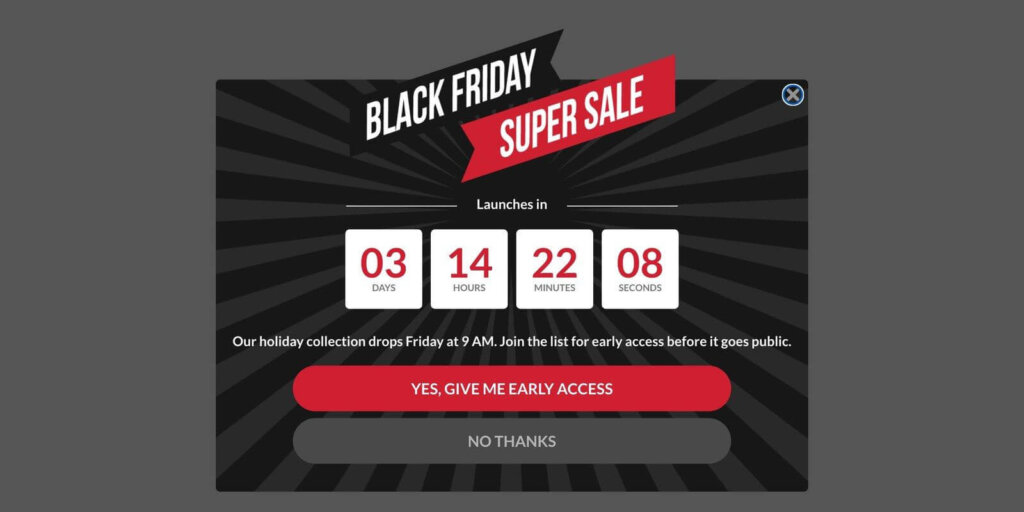
Where the timer sits on your page matters, too. On a product or content page, I’d recommend using a floating bar for a countdown, because it sits at the top of the page without covering what your visitor came to read. Save the full popup for the moment a shopper is about to leave.
For the full build, step by step, see our guide on how to create a countdown timer popup.
If you’re still choosing the tools for the sale, see our roundup of the best Black Friday marketing tools.
Small Business Saturday – Show Local Shoppers a Local Offer
Small Business Saturday is November 28, and the message that you show that day should be different from Black Friday’s.
Shoppers that day are looking for a reason to buy from a store near them, so being local matters more than the size of the discount.
The offer: If you have a shop or a service area, then you can show a Small Business Saturday message only to visitors in the towns you serve that offers in-store pickup, same-day delivery, or a thank-you offer for neighbors.
The email: Tell your local list about the offer by email the day before, and also post it in the local community groups your customers use. The website campaign is for the shoppers who find you on the day.
On your website: In OptinMonster, the Physical Location rule limits the campaign to the cities or regions you type in, so only local visitors see it.
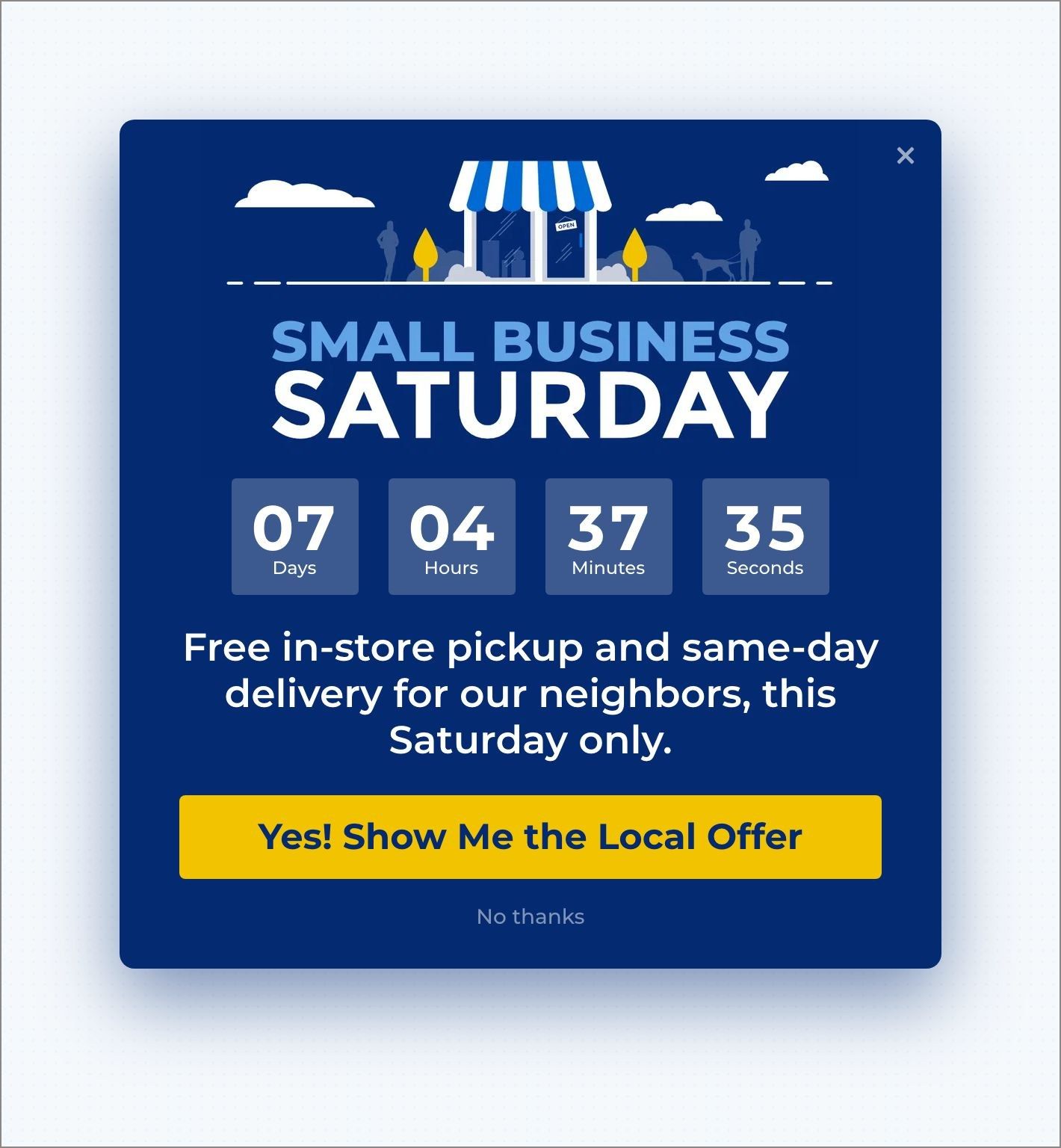
Visitors outside that area never see the campaign and keep seeing your regular Black Friday offer. For full details, see our guide to what geotargeting is and how to use it.
Cyber Monday – A Second Offer for the People Who Didn’t Buy
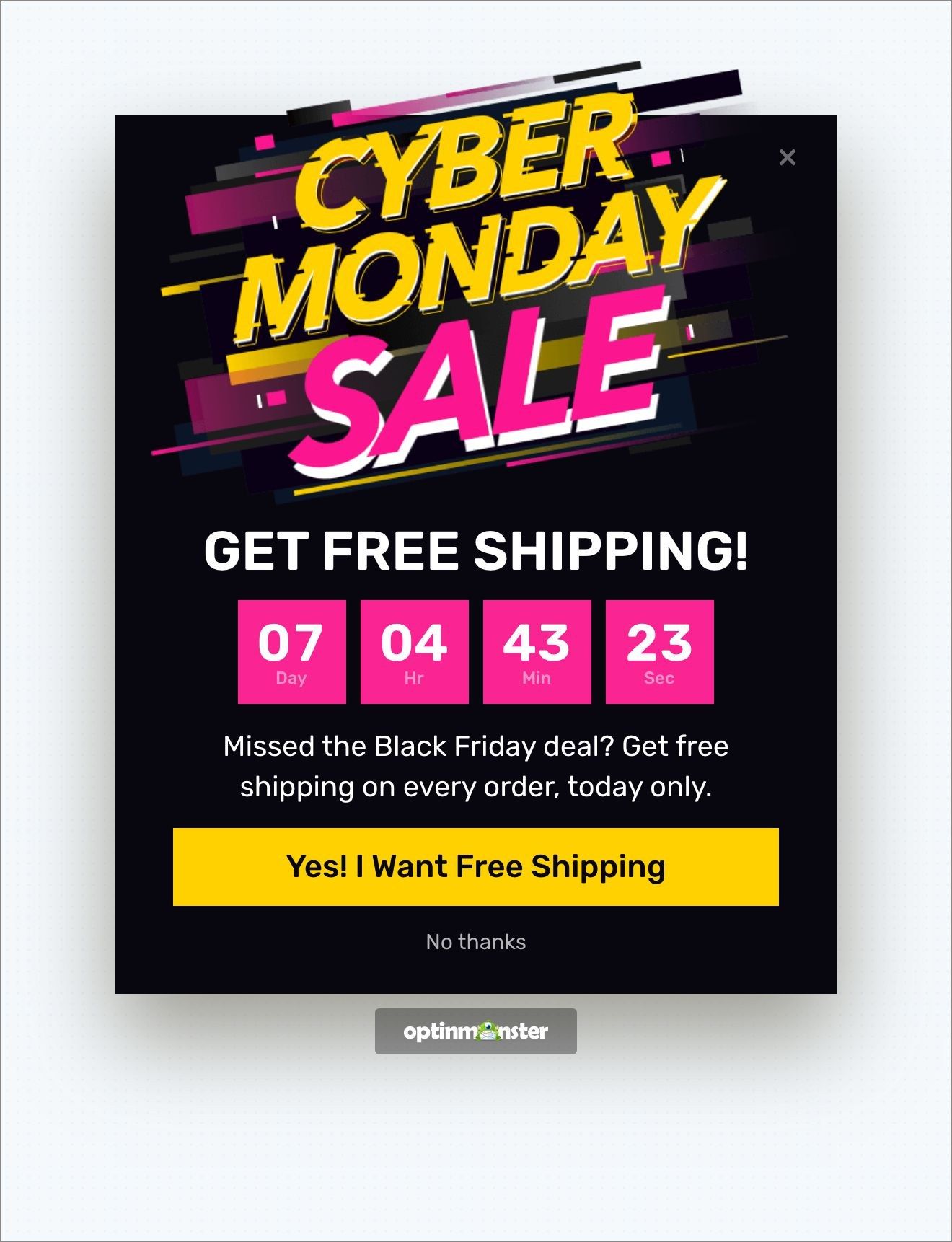
Cyber Monday is November 30, and it can feel tempting to run the same Black Friday offer again with a new banner. But the shoppers who bought on Friday don’t need the same offer again, and the shoppers who looked and left didn’t want the offer the first time.
The offer: You could also make the second angle free shipping or a bundle rather than a deeper discount, so shoppers don’t learn to wait for a better price.
The email: Write a fresh Cyber Monday email too, instead of resending Friday’s, and give the second offer its own subject line.
On your website: So, I’d give Cyber Monday a different angle and show it to the people who didn’t convert on Friday. OptinMonster’s OnSite Follow Up Campaigns® let you do that.
For example, your Black Friday campaign could offer a 10% coupon, and the Cyber Monday follow-up could offer 20% off only to the visitors who didn’t take the first one.
For full details, see our guide on how to make follow-up campaigns on your website.
Giving Tuesday – Ask for the Donation
Giving Tuesday is December 1, and it’s a day focused on donations. If you run a nonprofit, then this is often the biggest single day of your year-end campaign, and the people visiting your website that day want to donate. If you run a store, it’s a good day to show the cause you support and pause the sale messaging for the day.
The offer: The donation itself, with a named goal and a real deadline, and no coupon attached.
The email: The email to your donors matters as much as the popup, and we’ve collected nonprofit newsletter examples to work from.
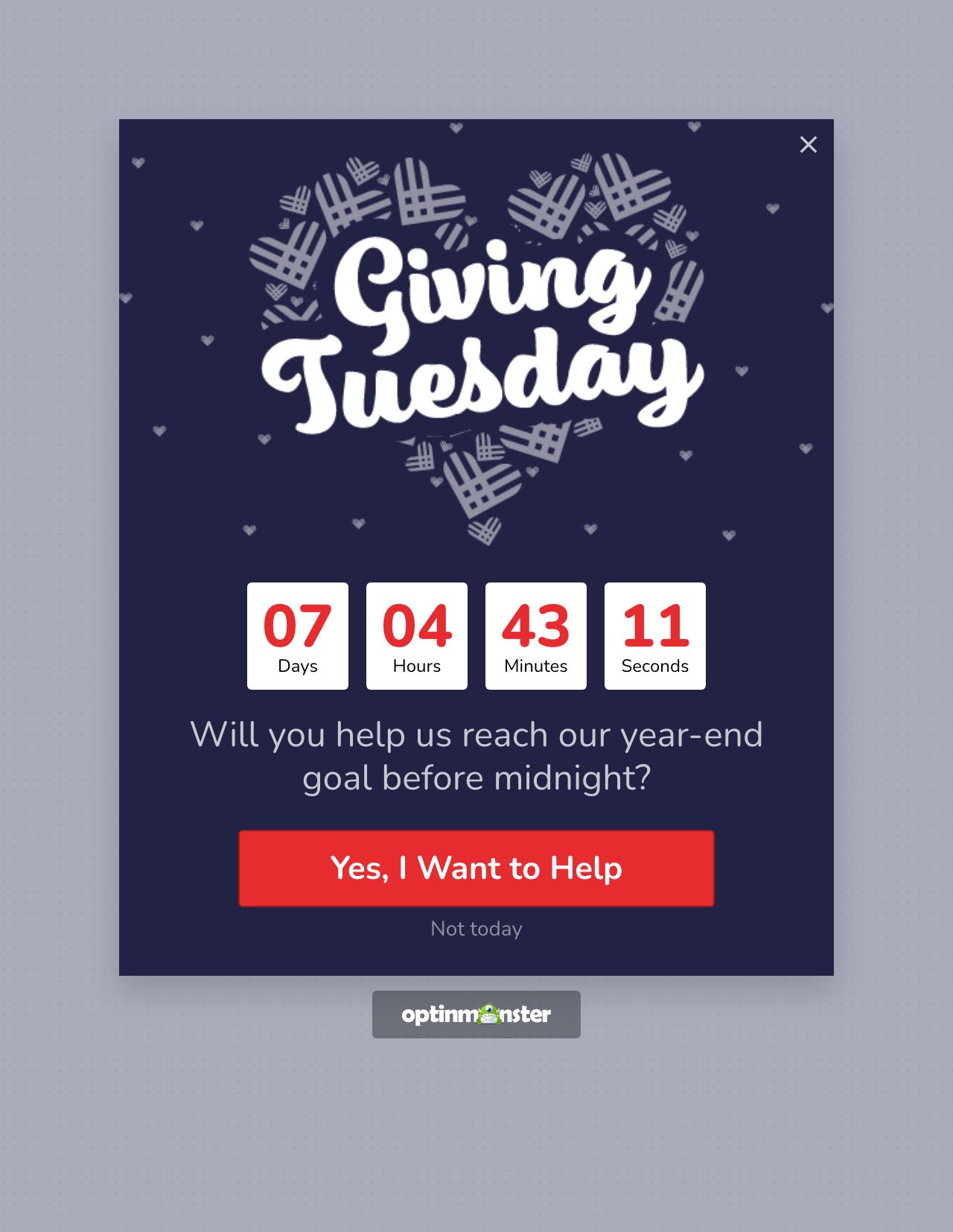
On your website: The campaign I’d build is a popup or floating bar that names the goal and shows how close you are to it. A visible fundraising progress bar does that job, so each donation feels like it makes a difference.
You can also add a Yes/No view in front of the donation form. Then the first thing the visitor sees is a question (“Will you help us reach our goal?”), and the form comes after a yes.
For more ideas, see our tips on how nonprofits can boost year-end donations with popups.
December – Urgency & Recovering Abandoned Carts
December shoppers are buying for other people, they’re running out of time, and a lot of them leave without finishing.
The Gift-Guide Popup
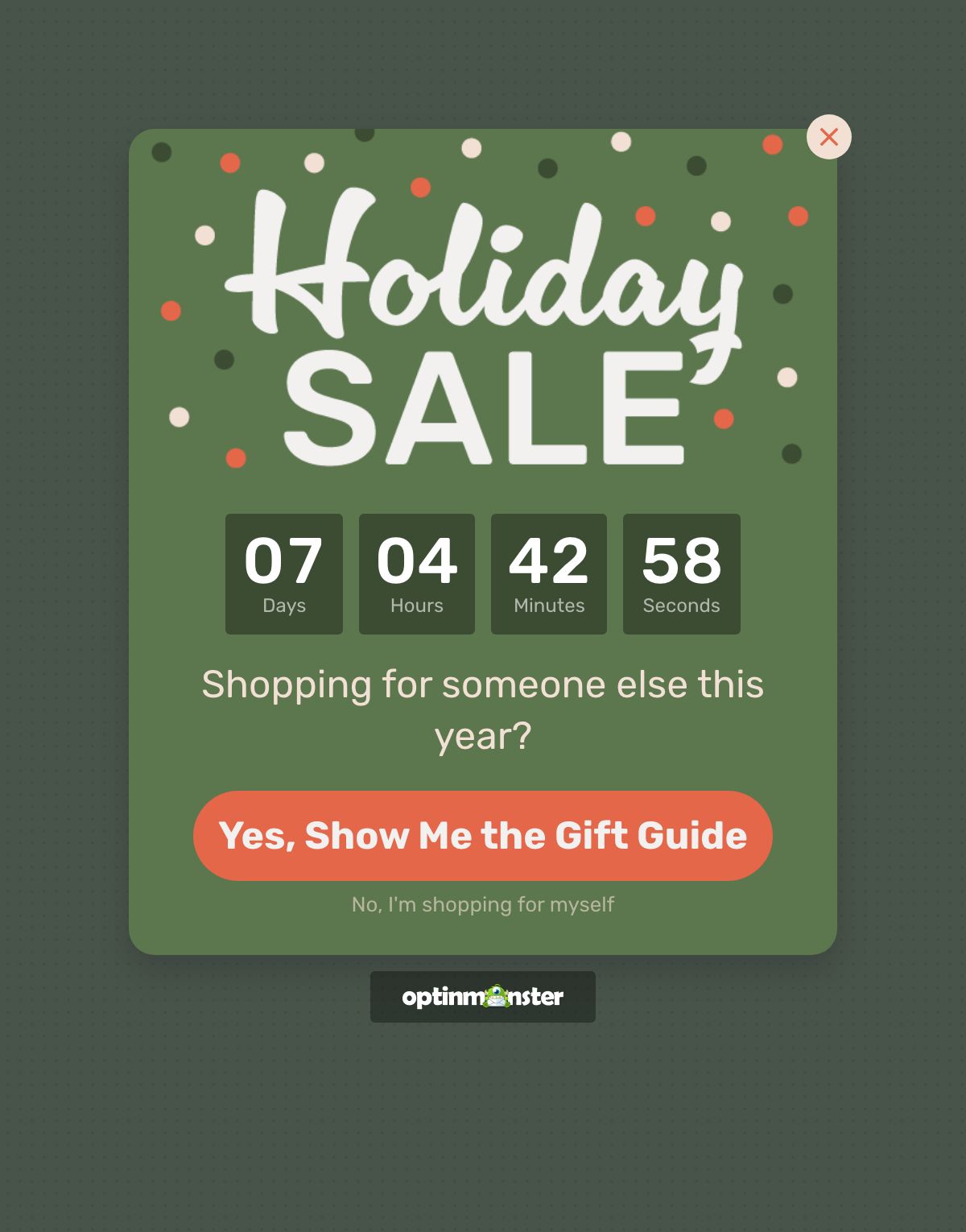
Someone shopping for a relative they rarely see doesn’t know which of your products to look at. A popup that asks one question and routes the answer works well here.
You can build a Yes/No view with “Shopping for yourself?” and “Shopping for someone else?”, where the second button sends the visitor to your gift guide or a curated collection page.
The gift guide itself works as an email and a social post too. Send it to your list in the first week of December, and the popup reaches the visitors who didn’t come from either.
For more options, see our guide to the best eCommerce lead generation strategies that actually work.
The Shipping-Cutoff Bar
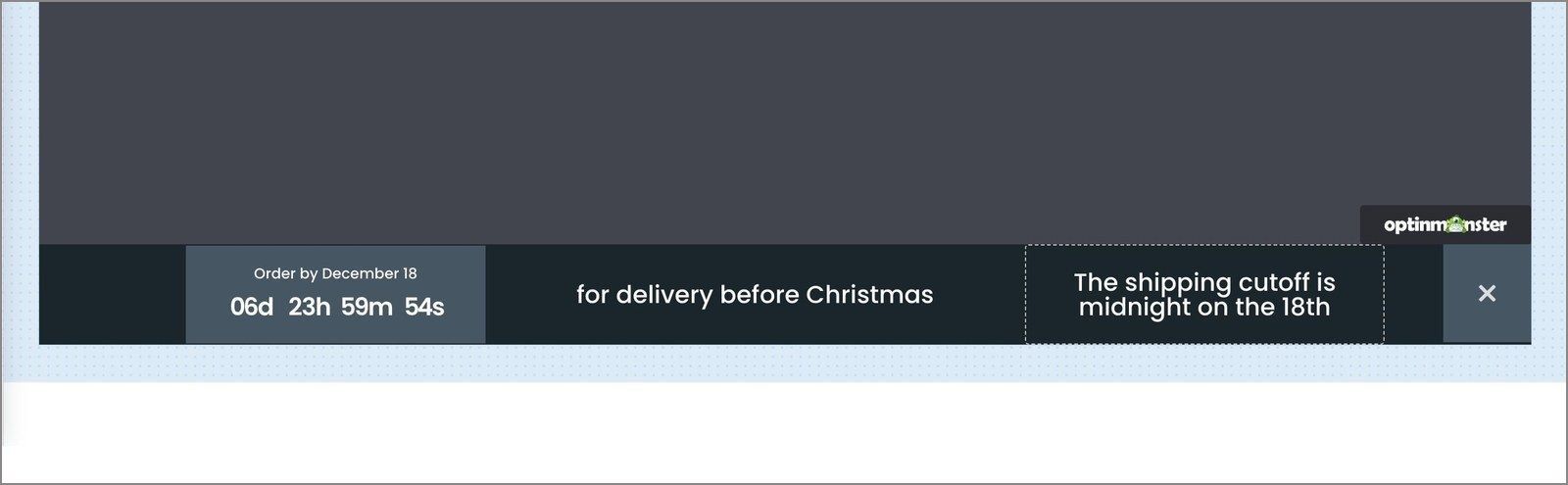
The last order date for delivery by December 25 is a real deadline, and your shoppers need to know it. Put that date in a floating bar on your product and cart pages with a Static countdown to the cutoff.
The setup is the same as in our guide on how to add a free shipping bar.
Just make sure to update the date as each courier deadline passes rather than building a new campaign every time. A reminder email to your list a day or two before the cutoff is also helpful, and you can add a countdown timer to the email, too.
Once the shipping deadline has passed, our last-minute holiday marketing guide has ideas for the final days before Christmas.
The Exit-Intent® Popup
Most of the people who add something to a cart during the holidays won’t finish their purchase. In fact, around 70% of shoppers will abandon their online shopping carts.
An exit-intent campaign appears at the moment a visitor is about to leave, with one reason to stay. That reason can be the coupon they were hoping for, free shipping, a reminder of the shipping cutoff, or an offer to save their cart by email so you can follow up.
OptinMonster’s Exit-Intent® rule detects the leave on desktop from mouse movement toward the browser bar and on mobile from a quick scroll back up the page.
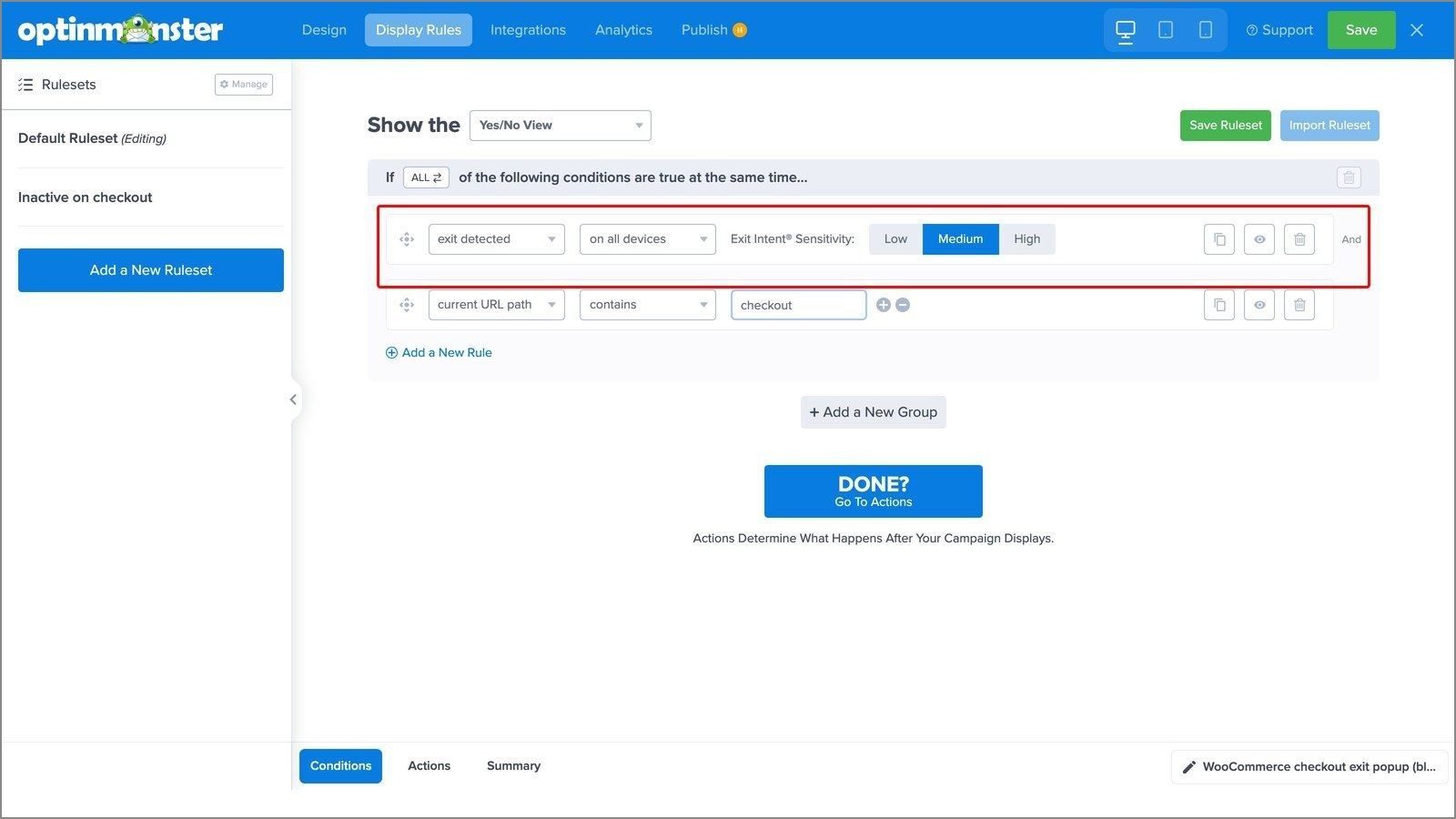
In our case study with the Christmas Lite Show, an exit-intent optin converted 49% of abandoning visitors. Over the four weeks tickets were sold online, nearly 30% of all site visitors either bought a ticket or subscribed for the coupon.
For more ways to use the trigger, see our exit-intent popup hacks.
Want your holiday campaigns built for you?
Our conversion experts will design 1 free campaign for you when you sign up for OptinMonster, so your first holiday popup can be live before the season starts.
After Christmas and New Year: Re-Engage the List You Built
Make sure not to treat December 25 as the final date of your holiday marketing campaign. The week after Christmas is full of shoppers with gift cards to redeem, returns to exchange, and January budgets to spend.
The offer: Gift cards are worth focusing an entire campaign on. In our case study with the Nashville Pedal Tavern, a popup selling gift certificates brought in $2,300 in 14 days.
The email: Next, it’s time to look at the email list you built in October. It’s now full of people who bought from you once, and getting them to buy a second time is often cheaper than finding a new customer. A short win-back email in the first week of January, with one offer and one button, is usually enough.
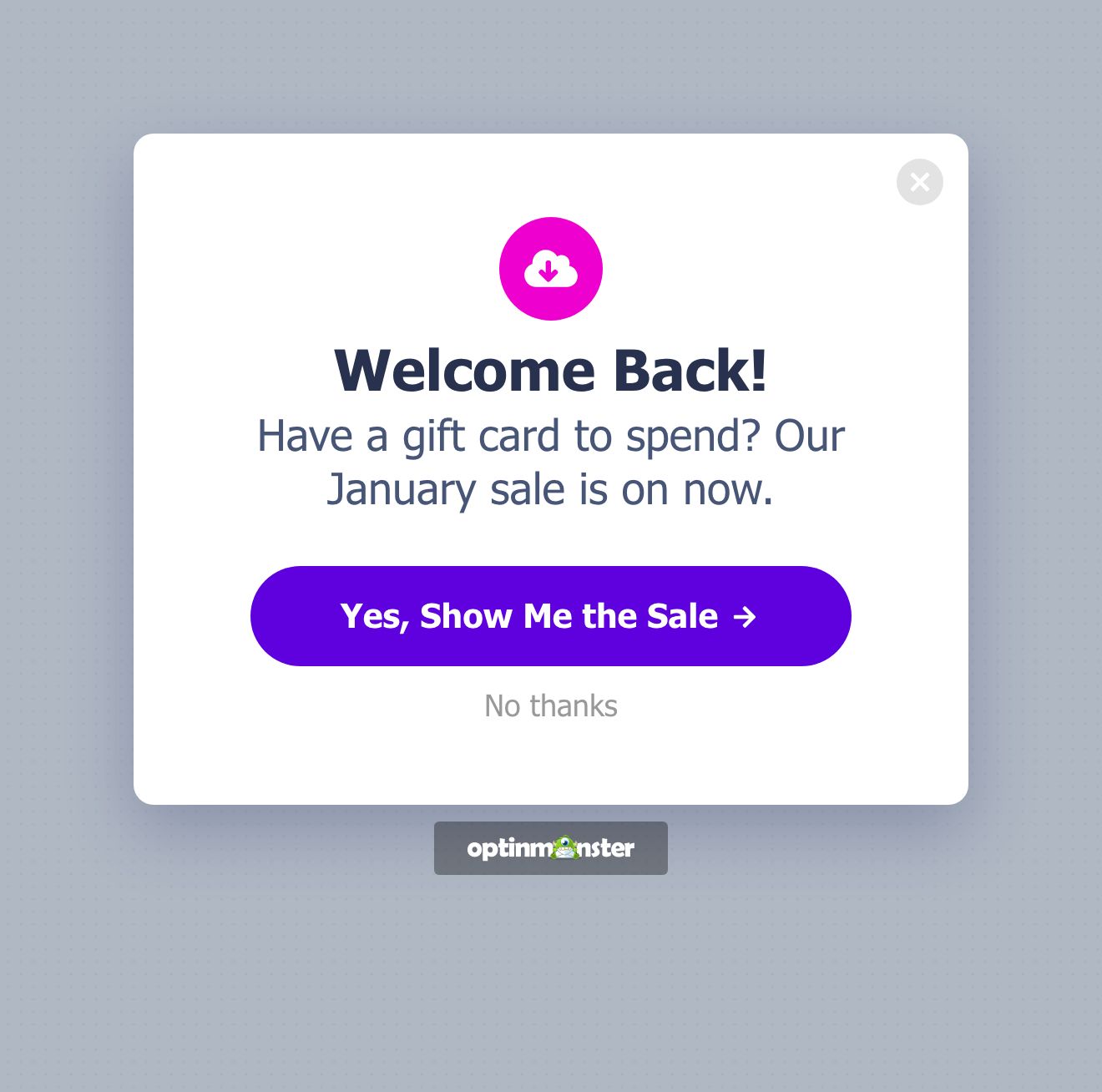
On your website: The campaign I’d recommend building for this week is for people who have shopped with you before. OptinMonster’s OnSite Retargeting® has a Returning Visitor rule.
With this campaign, a “welcome back” popup with a gift-card reminder, a “complete the set” offer, or your January sale shows only to visitors who have been to your website before. First-time visitors still see your signup.
For the setup steps, see our guide on how to create a popup for returning visitors.
But before you build any of this, keep one limit in mind.
If your website gets very little traffic yet, or you don’t have an email platform to send to, then you should focus on building the email list first. Then you can come back to the campaigns when there are visitors to show them to.
Holiday Marketing Campaigns FAQs
What are some examples of holiday marketing campaigns?
Common holiday marketing campaigns include an early-access signup for subscribers in October, and a Black Friday sale with a countdown to a real deadline. A Cyber Monday offer shown only to shoppers who didn’t buy on Friday is another.
Later in the season, you can run a Giving Tuesday donation ask, a shipping-cutoff reminder, an exit-intent popup for shoppers about to leave, and a post-Christmas gift-card or January sale for returning visitors. The strongest campaigns grow your email list first and sell to that list second.
What makes a Christmas marketing campaign effective?
An effective Christmas marketing campaign solves the two problems December shoppers have. They’re buying for someone else, and they’re running out of time. A gift guide or a “shopping for someone else?” popup handles the first problem, and a visible shipping-cutoff date with a countdown handles the second.
Add an exit-intent offer for the shoppers who leave their cart, and keep every deadline real, because shoppers may stop trusting a timer that resets.
When should you start your holiday marketing campaigns?
Start building your holiday marketing campaigns as early as you can, and treat mid-October as the latest date to begin. You should first focus on building your email list, because every address you collect in October is a person you can reach for free in November and December.
Black Friday and Cyber Monday campaigns should be built and scheduled before Thanksgiving week, so you’re not switching them on by hand during the sale.
Get Started With Your Holiday Marketing Campaigns
The stores that do best over the holidays start early, match each campaign to the specific holiday, and keep their deadlines real.
But if you only do one thing this week, then build your email list. Every marketing campaign after that is easier when you have people to send it to.
Ready to build your first holiday campaign? Get started with OptinMonster today!
Disclosure: Our content is reader-supported. This means if you click on some of our links, then we may earn a commission. We only recommend products that we believe will add value to our readers.
Add a Comment