
How to Launch a Product: 14-Step Checklist for Your Next Product Launch
Last updated on
by
You’ve put time, sweat, money, and maybe a few tears into developing a new product. Now, you need a launch plan that will reach your target audience and drive sales.
My product launch checklist covers 14 steps across three stages: pre-launch, launch, and post-launch. The steps work for any business that sells online, whether you’re launching your first product or adding to an existing line.
I’ll walk you through each step below. If you only want the list, then you’ll find all 14 steps at the start of the checklist section, ready to copy into your own launch plan.
What Is a Product Launch?
A product launch is when you introduce a new product into the market. Most of a launch is the work you do before the product goes live. You plan what you’ll say, where people will hear about the product, and how you’ll build excitement.
When that planning goes well, then more of your target customers will be ready to buy on launch day.
Overview of Product Launch Stages
To create a comprehensive product launch plan, you need to understand the 3 basic stages involved:
- Pre-Launch: This stage is where you work out who you’re selling to, set your goals, and start building interest with your audience. You also make sure the product, your website, and your support team are ready before anyone buys.
- Launch: This stage covers launch day and the few days after it. You publish your announcement, run the campaigns you planned, and watch how your first customers respond.
- Post-Launch: Afterward, you collect customer feedback, compare the results with the goals you set, and change whatever isn’t working.
Keep in mind that not every launch needs the full checklist. If you’re adding something small to an existing product line, then I’d recommend a lighter version of each stage.
For example, you could send a short announcement to your current customers instead of running a full pre-launch campaign.
Importance of Having a Good Product Launch Strategy
When you start an online business, you need to create an eCommerce business plan and a digital marketing plan before you sell anything. You need a similar plan every time you launch a new product.
With a launch plan, you decide who finds out about your new product first and what you tell them. Without a clear strategy, even the most innovative products can fail to gain traction.
Successful Product Launch Example: Golden Monkey Gummies
For an example of a successful product launch, let’s look at NielsenIQ’s case study on Golden Monkey, a candy manufacturer and one of their market-data clients. Golden Monkey decided to launch a new gummy candy product.
Using NielsenIQ’s market data, the Golden Monkey team learned that gummy sales were growing in China. They also chose younger, health-conscious women as their target audience.
So, the team added juice and extra vitamin C to the recipe. And because convenience stores are the main sales channel for gummies in China, they matched the packaging and price to that channel.
All that research paid off at launch time:
Over the course of six months, the 30-year-old manufacturer was able to identify a growth opportunity, develop a new product, and enter a new market. And the success of the new Gummy product was clear from the get-go, eventually achieving $1.4 million in sales in the first month after launch.
So, if you want your own product launch to succeed, then make sure to research your audience, your pricing, and where you’ll sell a long time before launch day.
Product Launch Checklist: 14 Steps to Successfully Launch a New Product
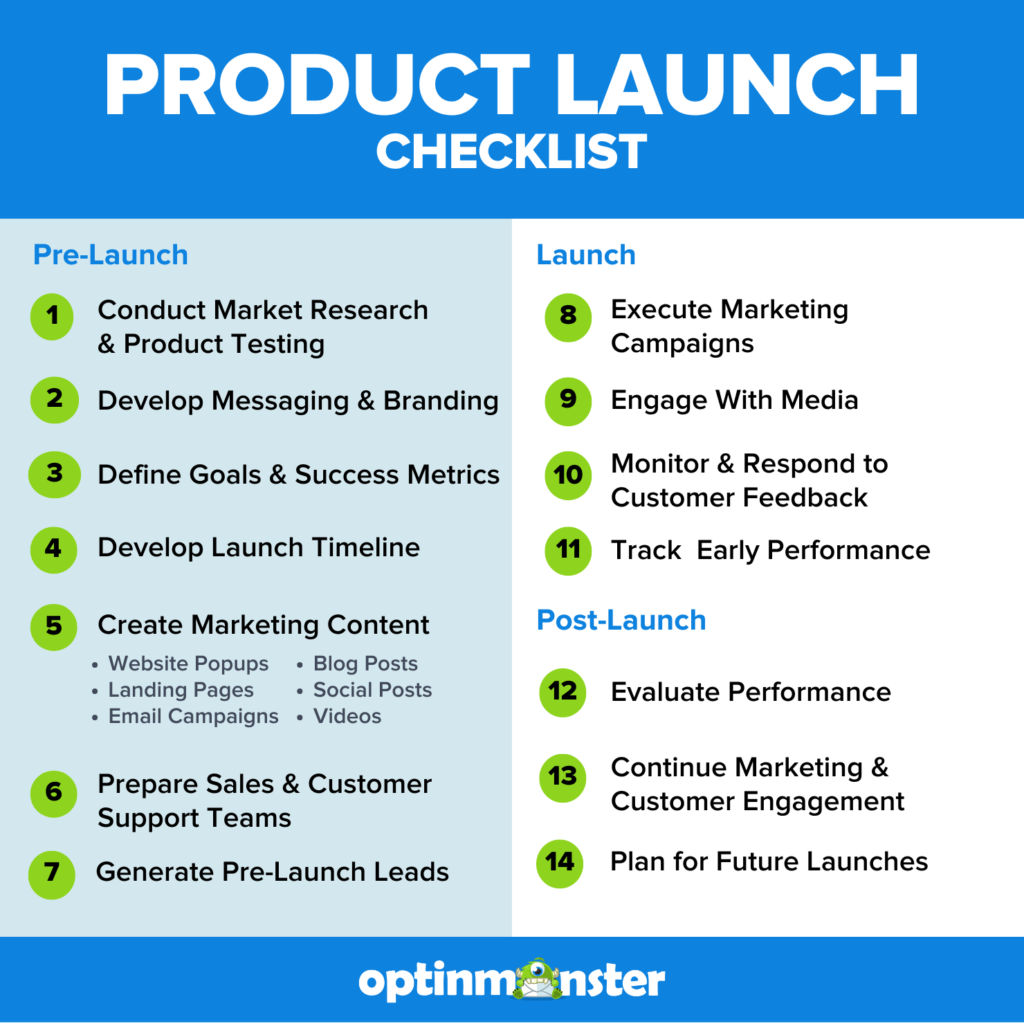
I’ve listed all 14 steps first, with each one linked to its section below. Steps 1 to 7 come before launch day, 8 to 11 cover the launch itself, and 12 to 14 come after.
Of course, every business and product is different, but this checklist will provide a basic template for your product launch strategy.
- Conduct Market Research & Product Testing
- Develop Marketing Messaging & Branding
- Define Goals & Success Metrics
- Develop a Launch Timeline
- Create Marketing Content
- Prepare Sales & Customer Support Teams
- Generate Pre-Launch Leads
- Execute Marketing Campaigns
- Engage With Media
- Monitor & Respond to Customer Feedback
- Track Early Performance
- Evaluate Performance
- Continue Marketing & Engaging
- Plan for Future Launches
Pre-Launch Stage
Most of the work happens before launch day.
These seven steps take you from your first research to a list of people waiting to buy.
1. Conduct Market Research & Product Testing
- Identify Your Target Audience: Make sure to talk to the people you’re building for before you write any launch copy. With surveys and customer interviews, you can learn who buys and why, and turn those answers into buyer personas.
- Analyze Competitors: I suggest reading your competitors’ product pages, prices, and customer reviews side by side. In their negative reviews, you’ll often find the gaps that your product can fill.
- Validate Product-Market Fit: Before you commit to a launch date, you could show an early version to a few potential customers and ask whether they would pay for it. This is also the time to settle your price and any launch offer, before you build the campaigns that will mention them.
2. Develop Marketing Messaging & Branding
- Unique Value Proposition (UVP): You’ll want to say in one sentence what your product does for the customer that the alternatives don’t. If you need a starting point, then our guide to writing value propositions has examples you can borrow from.
- Key Messaging: You can then write the few points your launch emails, posts, and popups will all repeat.
- Branding Elements: The product name, logo, and product images need to be final before anyone starts designing campaigns.
3. Define Goals & Success Metrics
- Outcomes: I would start with a target for each stage, such as early-access signups before launch, pre-orders, and sales after launch.
- KPIs & Metrics: You can pick the key performance indicators (KPIs) you’ll track, such as website traffic, email list growth, and revenue. Make sure your analytics and conversion tracking work before launch day.
4. Develop a Launch Timeline
- Set Key Milestones: It helps to start from launch day and work backwards, with a deadline for content creation, marketing campaigns, and internal training. When you pick the date, then check that it doesn’t clash with your own sales, and look for a seasonal peak that fits your product.
- Assign Responsibilities: Every task needs one named owner, so nobody assumes someone else is handling the launch email or the press kit.
5. Create Marketing Content
- Website Popups: To tell people who are already on your website about the launch, you can create popups, floating bars, and other campaigns that announce your new product. We made OptinMonster for exactly this job.
- Landing Pages: I’d suggest one landing page per launch offer, with a single, clear call to action (CTA). If you’re new to landing pages, then see our guide on how to create a landing page.
- Email Campaigns: You can draft and schedule your pre-launch email marketing campaigns now, so your early-access list hears about the product before anyone else does.
- Blog Posts: I’d recommend writing the announcement post before anything else, as part of your larger content marketing strategy. For example, for our Advanced Filters launch, we published that post first and built the launch video, social posts, a push notification, and an in-app promo from it.
- Social Media Posts & Videos: You can turn the announcement into a short update for each of your social channels, and record a quick announcement or demo video. Our video marketing guide has tips on making both.
Here’s a floating bar I made in OptinMonster to announce a launch date:
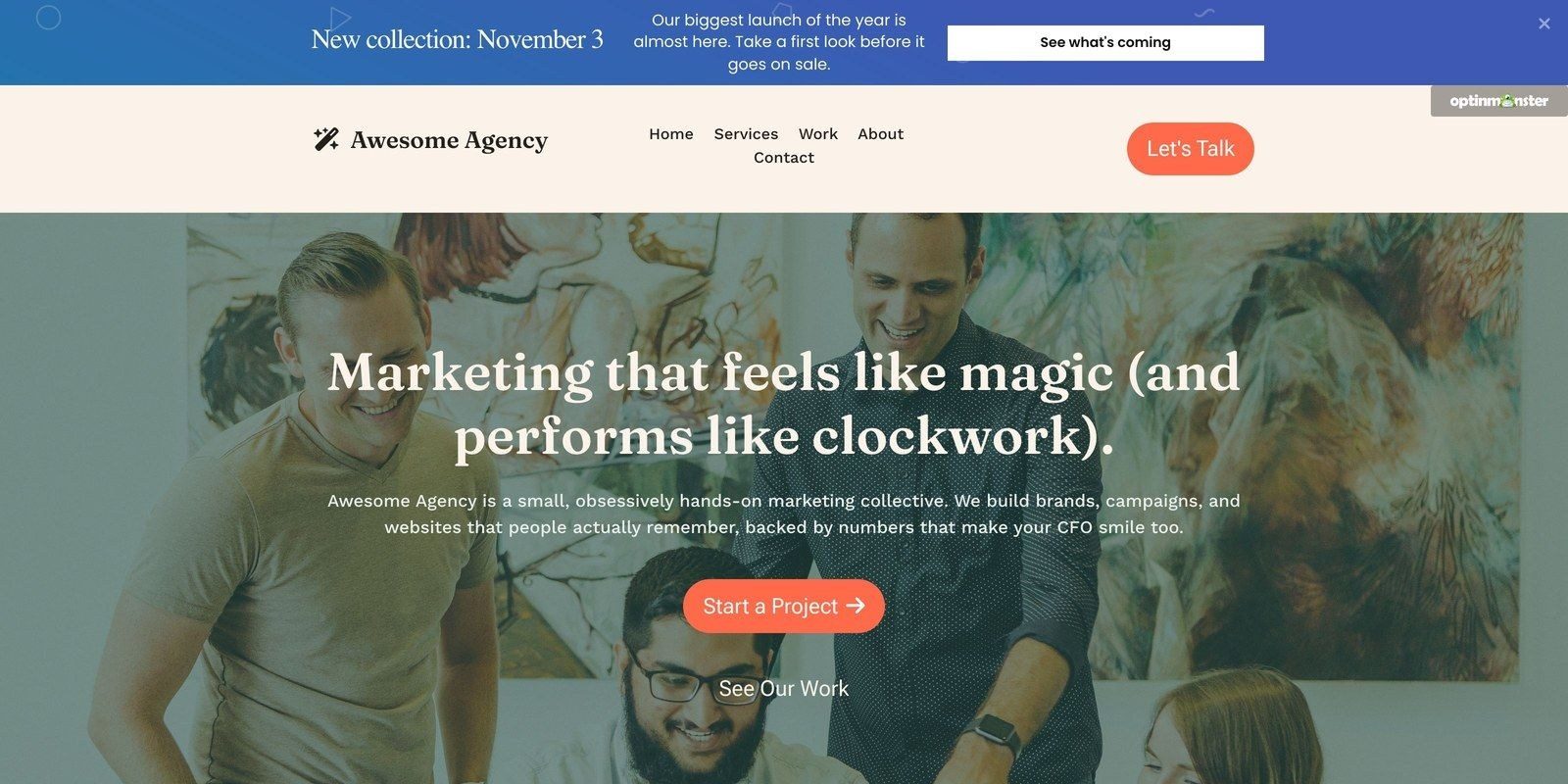
The bar stays at the top of the page, so visitors can see the launch date without anything covering what they came to read.
6. Prepare Sales & Customer Support Teams
- Training Sessions: You could walk your sales and support teams through the product, its price, and the key messages before launch day.
- Internal Documentation: Your team needs a product guide and an internal FAQ. Customer-facing help, like a product FAQ, setup instructions, or returns information, needs to be live before the launch email goes out too.
7. Generate Pre-Launch Leads
- Grow Your Email List: You can use website popups and your launch offer to grow your email list ahead of the announcement.
- Offer Early Access to Subscribers: Build excitement and FOMO (fear of missing out) by letting customers sign up for exclusive early access to your new product. You could also treat that early group as a soft launch, and fix what they find confusing or broken before the full launch.
To generate leads faster, you could add a countdown timer to the launch date, or a coupon wheel where new subscribers spin for a launch discount.
You don’t have to design a launch popup from scratch, because OptinMonster has 700+ premade templates you can edit in our drag-and-drop builder.
Here’s a product launch popup I made in OptinMonster:
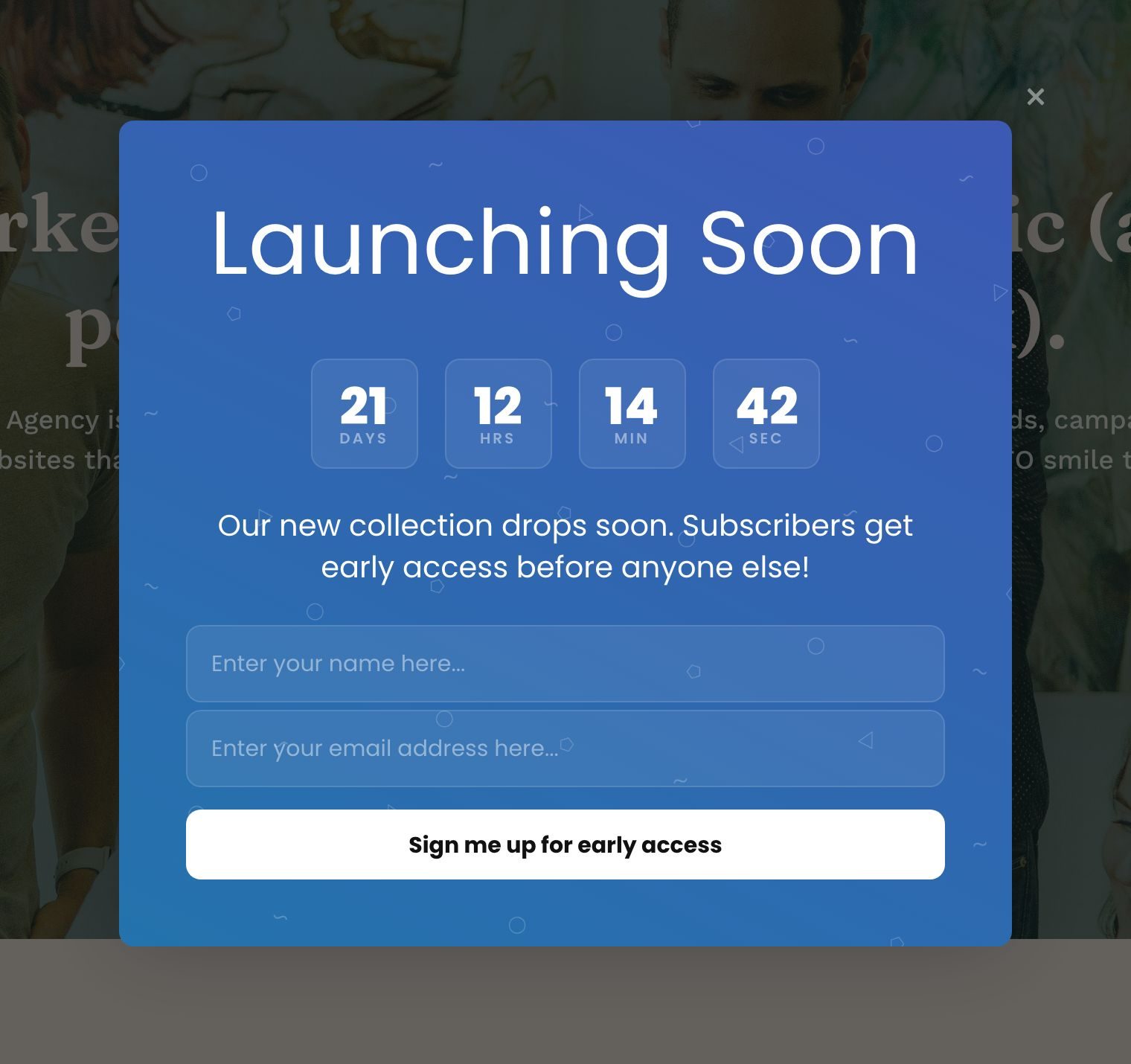
Visitors enter their name and email address to get early access. Then, you can keep marketing to that new lead with your promotional email campaigns.
Keep in mind that a countdown to a fixed date will show all zeros after launch day. So, see our countdown timer guide for how to end the campaign or show a new message when the timer runs out.
Want your launch popup built for you?
Our conversion experts will design 1 free campaign for you, so your launch popup is ready before launch day.
Launch Stage
These four steps cover launch day and the first week after it.
8. Execute Marketing Campaigns
- Final Readiness Check: A few days before launch, I’d recommend one meeting with everyone who owns part of the work to decide whether you’re ready. You can check the assets, tracking, and scheduled campaigns, place a test order, and then decide together whether to launch on time, delay, or launch with less.
- Backup Plan: Make sure to have a plan ready in case your website or checkout slows down under the extra traffic, or your stock runs out. You’ll want to write down who to call at your hosting company or developer, and draft a short delay notice for your homepage and social channels.
- Email & Social Media Blast: On launch day, you can send the announcement to your whole email list as soon as the product page is live. I suggest adapting that same message for each social platform, so the wording matches everywhere.
- Paid Advertising: If you’re running ads on Google, social media, or other websites, then you could start them on launch day and send that traffic to the product page instead of your homepage. Keep in mind that paid ads spend money from the first click, so check the first day’s results before you raise the budget.
- Influencer & Partner Promotions: Make sure your influencers and partners have their links, any discount code, and the launch date ahead of time, so their posts go out alongside yours.
On your own website, I’d replace your pre-launch campaigns with a launch offer, so visitors know the product is live.
Here’s a launch slide-in I made in OptinMonster:
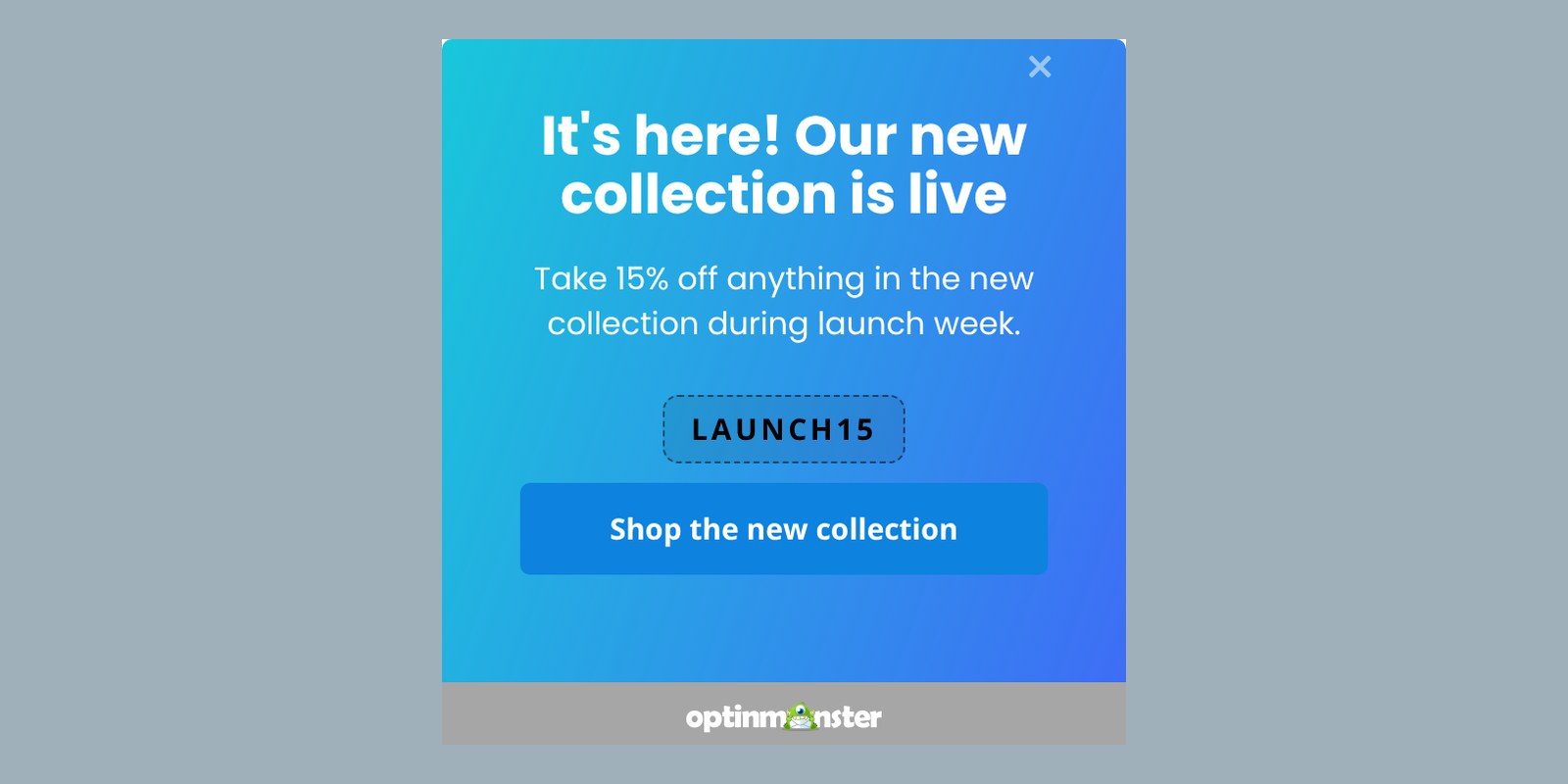
With a launch-week code, visitors have a reason to buy now instead of coming back later.
9. Engage With Media
- Press Release Distribution: Make sure to have a press release and a media kit ready before launch day. Then, you can send the press release to news outlets and industry publications with a link to the new product and the name of someone who can answer reporters’ questions.
- Media Interviews: You could book interviews or guest appearances on the podcasts, webinars, or blogs your customers already follow. I’d schedule them close to launch day, so people hear about the product while it’s new.
10. Monitor & Respond to Customer Feedback
- Social Listening: In the first few days, you’ll want to watch your social media channels for reactions and reply to questions quickly. With one of the best social media management tools, you can see what people are saying about your product in one place.
- Customer Support: I’d ask your support team to keep a running list of the questions and problems that come in. If the same question comes up more than once, then you could answer it on the product page or in your FAQ.
- Collect Customer Feedback: You can ask customers to rate and review your new product once they’ve had time to use it. You can also use your website to collect customer feedback while the launch is still fresh.
One easy way to collect that feedback is a survey popup in OptinMonster.
Here’s a feedback survey popup I made:
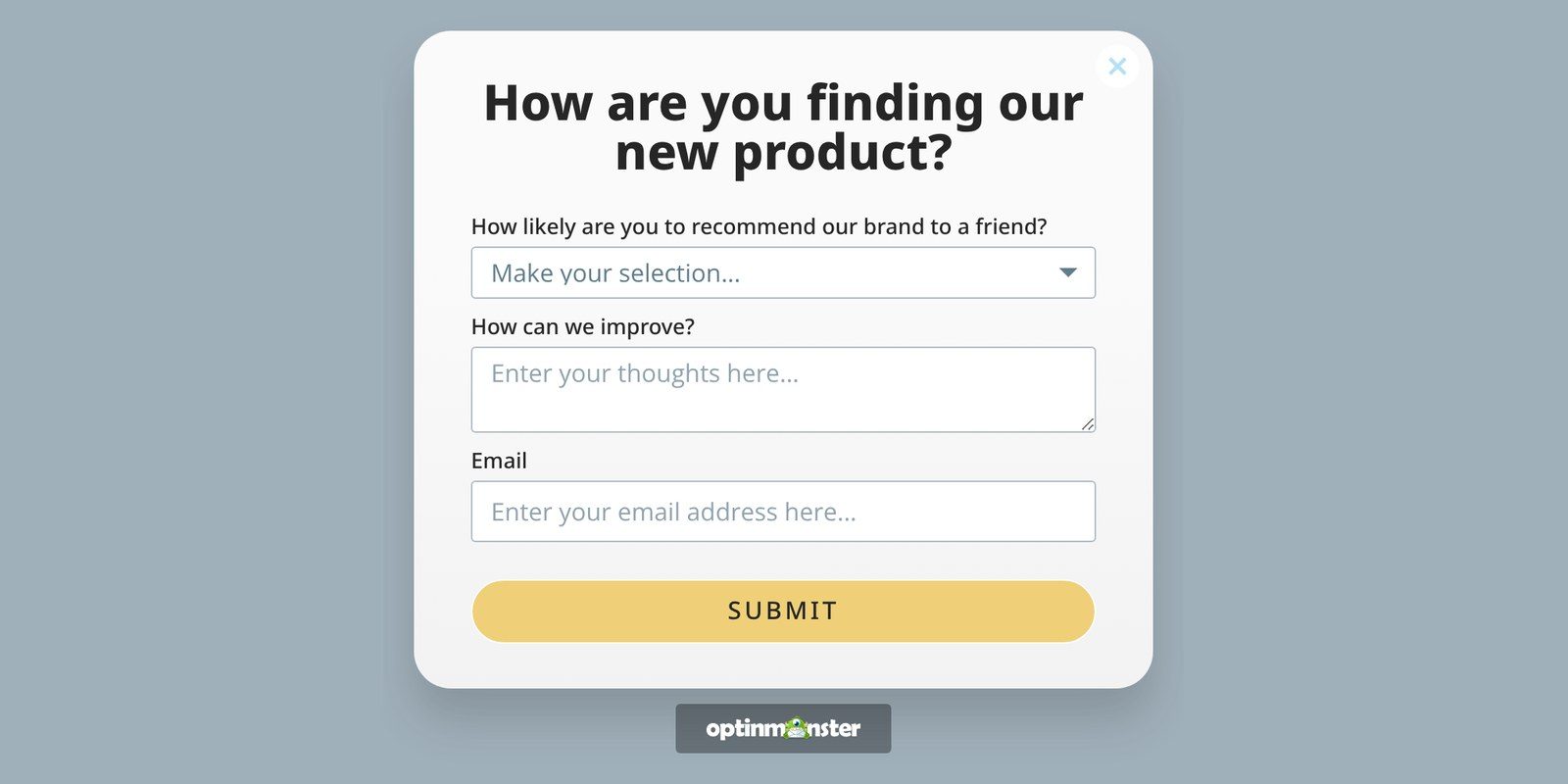
Want a feedback survey running on your website by launch day?
Our conversion experts will design 1 free campaign for you.
11. Track Early Performance
- Real-Time Analytics: Check numbers like website traffic, conversion rates, and sales each day during launch week.
- Adjust Strategies: If one channel brings in most of your sales, then you could move more of your time and budget there. And if a campaign isn’t converting, then you could try a new headline or offer before you switch it off.
Post-Launch Stage
Once launch week is over, you can use these three steps to turn your results into a plan for next time.
12. Evaluate Performance
- KPI Assessment: You can put your numbers next to the goals and KPIs from your launch plan, and mark each one as hit, missed, or close.
- Customer Feedback: You could sort your customer survey answers into what people liked, what confused them, and what they asked for that you can’t give them yet.
- Sales & Support Processes: You may want to review the support questions your team logged during launch week, and fix the product page or help docs that should have answered them.
13. Continue Marketing & Engaging
- Content Marketing: You’ll want to keep publishing blog posts and case studies about the new product for the people who missed launch day.
- Email Nurturing: I suggest planning a few follow-up emails for subscribers who clicked your launch email but didn’t buy. With each email, you can move them one step further along the customer journey.
- Social Media Engagement: You can keep the conversation going on social media with product updates, user-generated content, and customer testimonials.
- Special Offers on Your Website: Many website visitors won’t make a purchase the first time they visit. With OptinMonster’s Exit-Intent® Technology, you can show those visitors a special offer as they’re about to abandon their online cart, and OnSite Retargeting® lets you show a different offer when they return.
Here’s an exit-intent coupon popup I made for a checkout page:
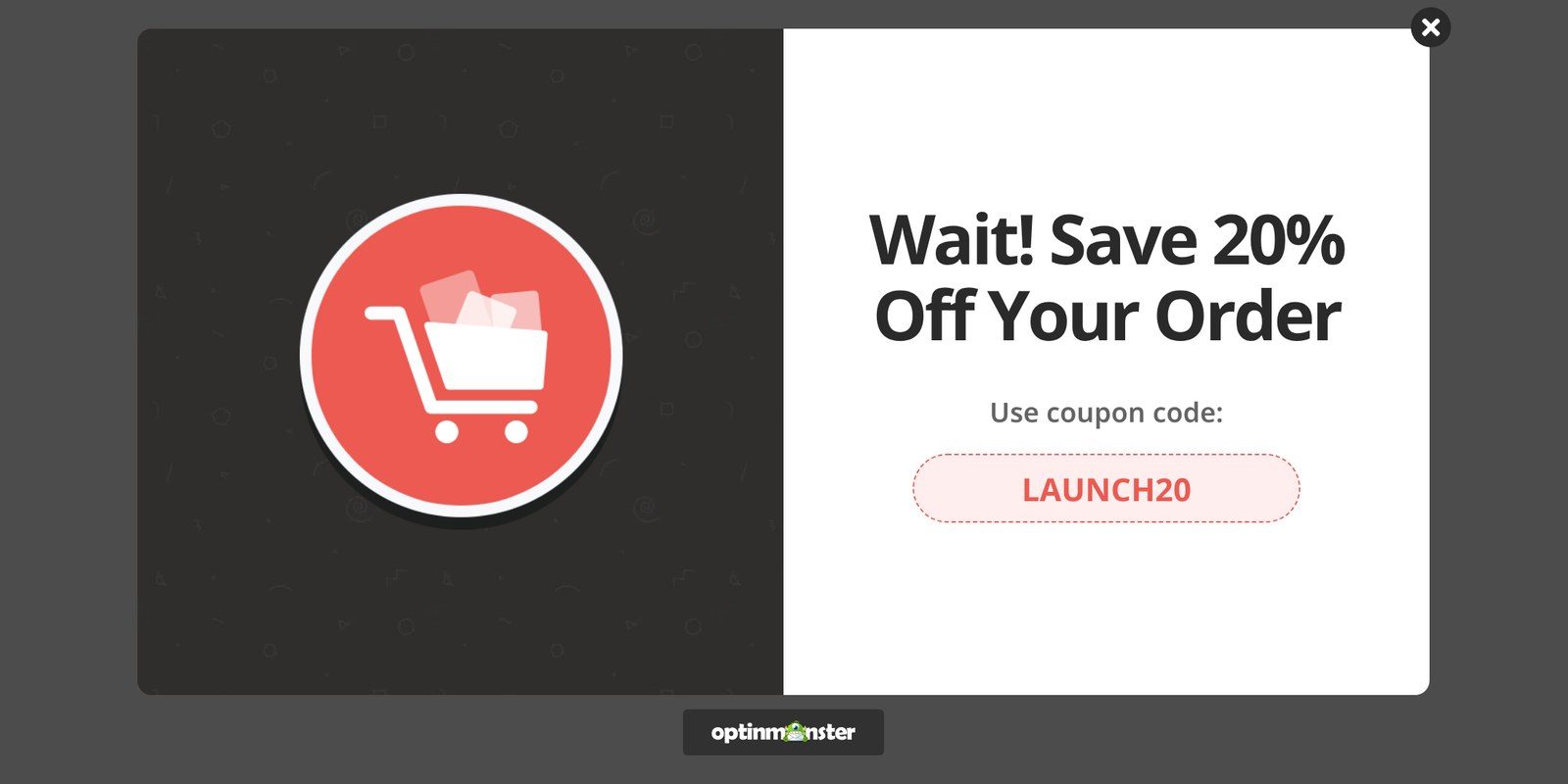
In our case study with Scott Wyden Imagery, their optin appeared only on the cart and checkout pages. That optin showed when a shopper tried to leave the website or stayed inactive for over 60 seconds, and it converted 21.06% of abandoning carts.
Alternatively, you could also target a popup to visitors exiting from the product page for your newly launched product. These visitors have shown a high level of interest in your product. A special discount might be enough to win that sale.
For full details, see our guide on how to create a cart abandonment campaign.
14. Plan for Future Launches
- Post-Mortem Analysis: Hold a review meeting with your launch team, and walk through this checklist to note what went well and what you’d change next time.
- Document Findings: I’d recommend writing what you learned into one shared document, with each decision and the numbers behind it. So, you can plan your next launch from those notes.
- Plan Next Product Updates or Launches: You could turn the most requested features and the most common complaints into your next product update. And you can reuse the launch pieces that performed best as the starting point for your next launch.
Product Launch Checklist FAQs
What are the 7 steps of a product launch?
You can group a product launch into 7 steps. Five come before launch, the sixth is the launch itself, and the seventh is the review.
Before launch, you research the market and set your message, then set goals and a timeline, prepare your content and team, and generate leads.
What should a product launch plan include?
A product launch plan should include who the product is for, what makes it different, and the goals you’ll measure the launch against. It also needs a timeline with an owner for each task, plus the content and channels you’ll use to share it.
What are the steps to launch a product?
Launching a product takes three stages: pre-launch, launch, and post-launch. Before launch, you research the market, build your content, and collect leads.
On launch day, you send your announcement and run your campaigns, then watch early sales and feedback. After launch, you compare the results with your goals and note what you’d change next time.
Create a Product Launch Plan & Grow Your Business!
I suggest starting with one decision: your launch date. Once you’ve picked a date, then you can build your launch timeline by working backwards from launch day.
If you want to build an email list before launch day, then I recommend using OptinMonster. We built OptinMonster to turn website visitors into subscribers and customers.
You can use a popup to collect early signups, then add a countdown timer to your launch-day offer.
Get Started With OptinMonster Today!
Want to learn even more about promoting new and existing products?
Here are a few resources:
Disclosure: Our content is reader-supported. This means if you click on some of our links, then we may earn a commission. We only recommend products that we believe will add value to our readers.
Add a Comment