Wondering whether OptinMonster will work with the platform your website is built on? Almost certainly yes, because OptinMonster asks only 1 thing of your site, and nearly every platform can provide it. In this article, you’ll learn how to tell whether OptinMonster will work on your type of website, and where to find the setup guide for your platform.
Before You Start
Here are some things to know before you begin:
- This guide is an overview. Once you know which method suits your site, the platform guide linked below walks you through the details.
- If your site runs on WordPress, then our OptinMonster WordPress plugin is the quickest route, and you won’t need to touch any code at all.
- You’ll want a campaign to work with, so our guide to creating your first campaign is a good place to start if you haven’t made one yet.
What Your Site Needs
OptinMonster loads through a small piece of JavaScript called your embed code. If you can get JavaScript onto your pages, whether that means pasting it into a template, using a plugin, or letting a tag manager insert it for you, then OptinMonster will work on your site.
That covers nearly every type of website: builders, content management systems, eCommerce platforms, and custom-built sites alike.
You’ll find your embed code in the campaign builder. Clicking the campaign’s status in the top toolbar, which reads Published, Draft, or Paused depending on where that campaign has got to, opens its publish settings. The Platform section there holds every embed option, and under Any Site you’ll see 2 of them:
- Global Embed (Recommended) is a single account-wide code. Once it’s on your site, every published campaign can appear without any further changes.
- Campaign Embed (Advanced) controls one specific campaign, and it has no effect on your other campaigns.
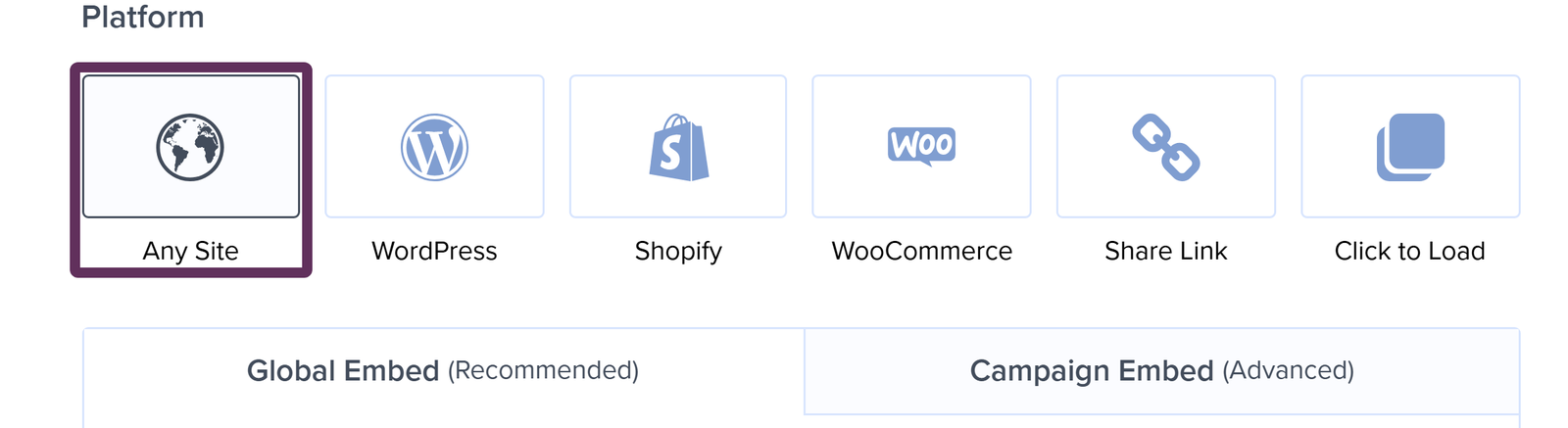
The same section carries shortcuts for WordPress, Shopify, and WooCommerce, which hand you the instructions for those platforms directly, plus Share Link and Click to Load for opening a campaign from a link you share.
We recommend pasting either code just before the closing </body> tag of your pages. Inline campaigns are the one exception, because their code belongs in the page content, exactly where you want the campaign to appear.
Note: Your account-wide embed code also lives on the Account > My Account screen, in the Account-wide Embed Code section, so you can grab it before you’ve built a single campaign.
Your Type of Website
We publish a setup guide for each of the most popular platforms, and you can browse every one of them on our platform documentation page.
WordPress
Site Builders and CMS
- Blogger
- ClickFunnels
- Drupal 7 and Drupal 8
- Jimdo
- Joomla!
- Kajabi
- RainMaker
- Showit
- Squarespace
- Tumblr
- Webflow
- Weebly
- Wix
- A plain HTML site
eCommerce Platforms
Any Other Website
If your type of website isn’t in the list above, then OptinMonster still works. Either of these 2 general methods covers everything else:
- Our guide to adding OptinMonster to any website walks through copying your account-wide embed code and pasting it into your site template.
- If you already manage your scripts through a tag manager, then our Google Tag Manager guide shows how to add OptinMonster as a tag instead.
FAQs
Do I need to know how to code?
No. On WordPress our plugin handles everything for you, and no code is involved.
On other platforms the job is copying a snippet from OptinMonster and pasting it into a settings field your platform provides for exactly this purpose. Each platform guide shows you where that field is.
My platform isn’t in your list of guides. Can I still use OptinMonster?
Yes. The guides exist to save you hunting for the right setting, and they aren’t a list of what we support. As long as your platform lets you add JavaScript, or lets you run a tag manager, OptinMonster will work. Our guide to adding OptinMonster to any website covers the general approach.
Can I use OptinMonster on more than 1 website?
Yes. You register each site in your OptinMonster account and then choose which sites a campaign runs on, as our guide to adding a website explains. The number of sites you can register depends on your subscription.
Do I need a separate embed code for every campaign?
Not if you use the Global Embed code. That single code lets every published campaign appear, so adding, replacing, or removing a campaign later needs no change to your site. The Campaign Embed code is the alternative, and it has to be added everywhere you want that one campaign to appear.
Will OptinMonster slow down my website?
Your campaigns load after the rest of the page has loaded, which is why we recommend placing the embed code just before the closing </body> tag. Our guide to optimizing campaign usage covers the habits that keep the impact small, and the technical performance overview has the detail if you want to dig in.
Troubleshooting
I added the embed code, but my campaign isn’t appearing on my site.
2 separate things have to line up before a campaign shows:
- The campaign has to be published in OptinMonster, which our guide to embedding and publishing campaigns covers.
- Its Display Rules have to allow it on the page you’re looking at.
If both look right, then a cookie from your own earlier testing is the next thing to rule out, so it’s worth checking again in a fresh Incognito window.