Creating forms is easy using our drag-and-drop editor, and connecting forms to the most popular Email Service Providers (ESP) is too. But sometimes, you may need to use a custom form you’ve created yourself outside of OptinMonster, or to integrate with an email marketing platform we don’t yet support. Our Embed Form block is perfect for embedding an HTML or Javascript form into your OptinMonster campaign.
In this article, you’ll learn how to embed any HTML form into an OptinMonster campaign using the Embed Form block.
Before You Start
Are you looking to add extra fields to your optin form and prefer to use one of our native Integrations?
Field Mapping is a brand-new feature available for our most popular Email Service Providers. You can easily add radio buttons, phone fields, text areas, number fields, lists, and more!
Custom HubSpot forms must be edited following this guide to function correctly.
Custom Marketo forms must be edited following this guide to function correctly.
Your custom form’s styling may need to be controlled using Custom CSS.
Looking to add a WordPress shortcode to your OptinMonster campaign? Learn how to add shortcodes.
Embed Form
To add an HTML form to your OptinMonster campaign, follow these steps:
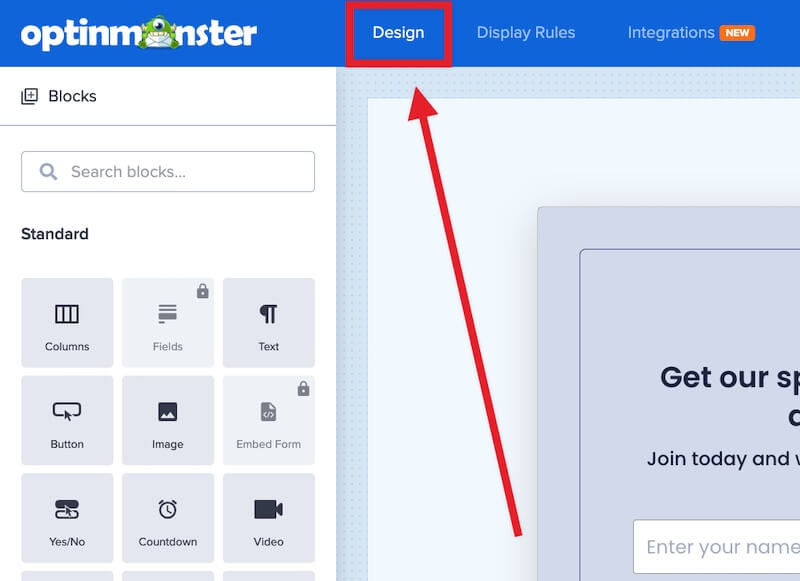
- Navigate to the Design view of the campaign builder.

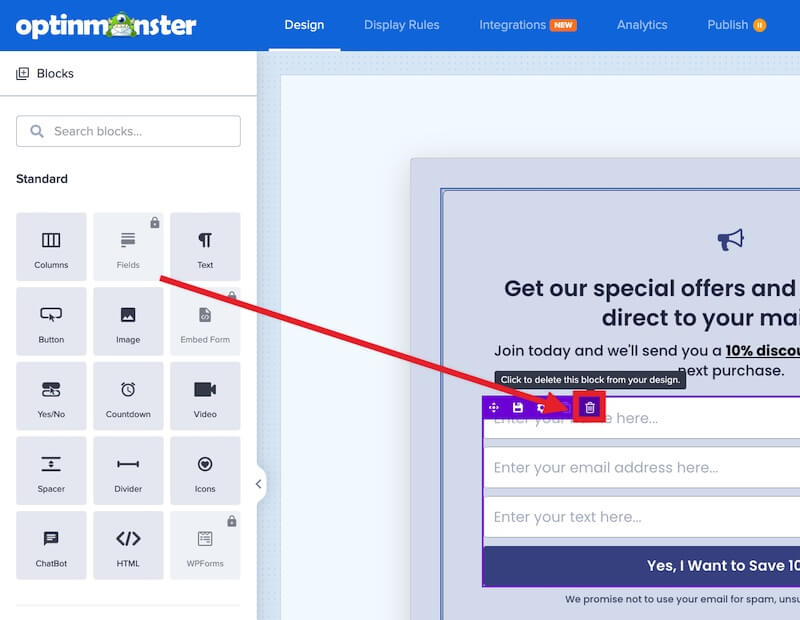
- If your OptinMonster campaign already contains a Fields block, you’ll need to delete it.

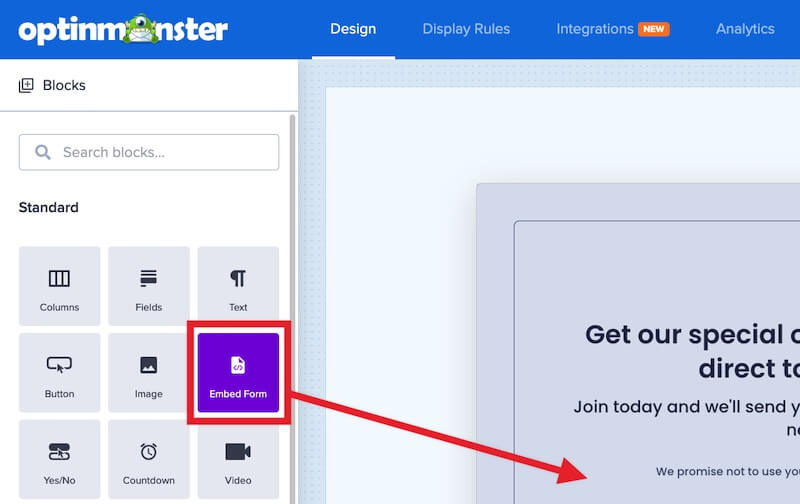
- You can now drag the Embed Form block into your campaign’s design where you want to show the HTML form.

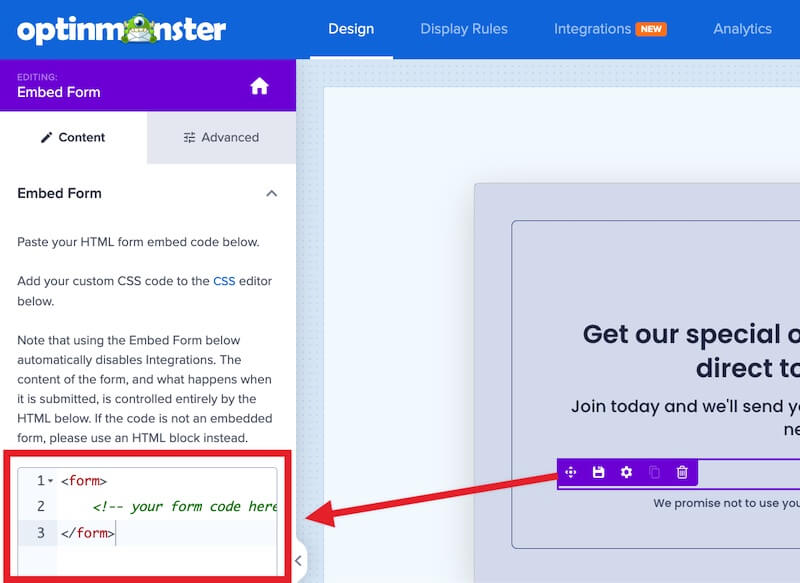
- In the left sidebar panel the Embed Form block settings will provide a field for you to paste your HTML form’s embed code into.

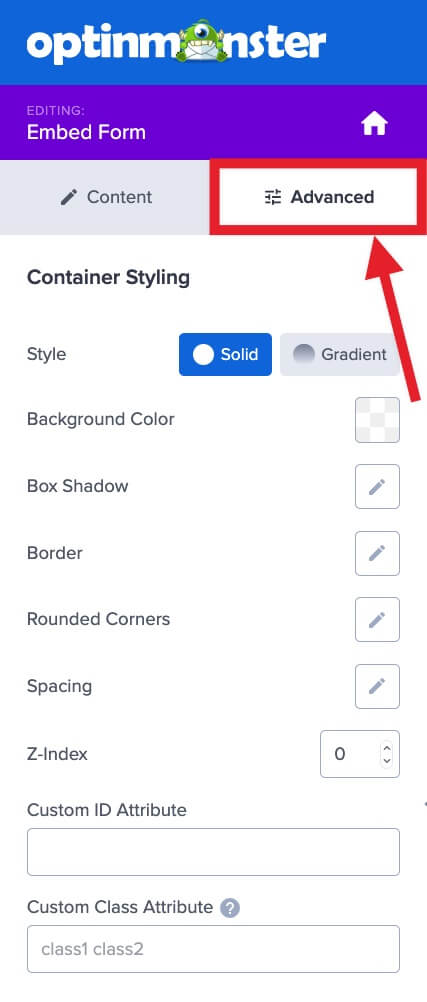
- Optional: You can configure additional styling settings for the Embed Form block in the Advanced tab of the left sidebar panel.

- Recommended: Update your HTML form embed code following the next section in this guide to track conversions and set cookies (to control how often the campaign can reappear).
- When you’re finished, Save the campaign.
Form Events
Conversions and Cookies
Submitting your custom HTML form does not record a conversion on its own, so you’ll want to tell OptinMonster when one happens and set cookies. There are 3 ways to do that, and the right one depends on how your form works.
- Javascript on your form’s success callback is the most accurate, because the conversion is recorded only once your form confirms the submission worked. Use this whenever your form gives you a success callback.
- Javascript on the form’s
onsubmitevent is the simplest option. Use this when your form posts normally and reloads the page. - A class on the submit button works when there is no form to hook into at all, such as a link or a button.
A success callback is the code your form runs after your server confirms the submission worked. If your form is plain HTML that posts and reloads the page, then you don’t have one, so use the onsubmit event or the submit button class instead.
Important:
The onsubmit event and the submit button class both fire the moment the visitor submits or clicks, not when the submission succeeds. If the submission then fails, the conversion is still counted. Whenever your form gives you a success callback, use that for accurate tracking.
Javascript
Add the following line wherever your form confirms a successful submission:
If your form posts normally and reloads the page, then add the same call to the form’s onsubmit event instead. Here’s a complete example:
Notice: If your submission code redirects the visitor when it succeeds, then OptinMonster has no opportunity to record the conversion.
Running More Than 1 Function
You can run more than 1 of the functions in this section from the same event. Separate them with a semicolon. On a link, add return false; at the end so the browser doesn’t follow the link:
The same applies to a form’s onsubmit event, where you leave out the return false; so the form still submits.
Submit Button Class
Note:
This counts any click on the element as a conversion, even if the form then fails to submit. If your conversion count does not match your captured leads, then the Troubleshooting section below explains why.
A class is an HTML attribute you add to an element, not a piece of CSS. Adding om-trigger-conversion to your form’s submit button tells OptinMonster a conversion has happened, and sets cookies if you’ve configured them for your campaign:
Tracking a Conversion Without Setting Cookies
To record the conversion but leave cookies alone, use the class om-trigger-alt-conversion instead. This is useful on a link you want to count without stopping the campaign from appearing again:
Interactions
Separate from conversions, you can also count form interactions and pass that data to Google Analytics.
Learn how to track Custom HTML form interactions
Success Actions
You can customize the success action for your embedded form to change the campaign view or close the campaign.
Change View
Use one of the following Javascript examples on your form’s success callback to change to the specific campaign view you’d like to display on submission:
Close Campaign
Use the following Javascript on your form’s success callback to close the campaign on submission:
Form Validation
You may wish to validate the fields in your embedded form but aren’t sure where to begin.
The following are examples of validating an HTML form to help you get started.
These examples should not be used as-is but edited to fit your particular needs.
Javascript Validation Example:
The following code provides an example of Javascript validation for an HTML form:
Javascript Validation with AJAX Example:
The following code provides an example of Javascript validation with AJAX for an HTML form:
FAQs
How can I control the styling of my custom form?
Custom HTML forms do not automatically inherit the default styling of your optin template. You can control the appearance using Custom CSS.
Get started using Custom CSS with your campaign
My custom form is in an iFrame element. Can I still track conversions?
Due to the nature of iFrame elements, it is not possible to track clicks that take place within the iFrame element.
This is a limitation of technology and not unique to OptinMonster.
Whenever possible, you should use an HTML or Javascript form embed option if one is provided to you, instead of an iFrame embed.
I’ve added the Embed Form block to my campaign, but the Integrations view in the builder is now disabled; why?
It is not possible to add a custom HTML form and connect with our native Integrations in a single campaign. If the Embed Form block is added to your campaign the Integrations view will be disabled. To resume using a native Integration you’ll need to first delete the Embed Form block from your campaign.
Why are my inline comments being wrapped by multi-line comments?
OptinMonster will wrap all inline comments into multi-line comments, which is necessary for OptinMonster’s proper handling and processing of the code involved.
For example, this:
// Your Commentsbecomes this:
/* // Your Comments */Troubleshooting
I’m using the Button Class to track conversions but the number of conversions does not match the number of leads captured. Why?
Using the Button Class method can result in false conversions being counted.
The Button Class will count any click event on an element containing the class as a conversion. If you add this to a submit button, for example, and the form fails to process successfully on the first click it will still be counted as a conversion!
Whenever possible you should use the Javascript method provided above for the most accurate tracking.
Why doesn’t my Custom HTML form with Javascript track conversions?
If your form submits with Javascript, then the last line of your submit code has to be:
Without it, the submit event stops early and OptinMonster never sees the conversion.
My Javascript form isn’t working; why?
Javascript-based forms are supported. However, a Javascript error in your form code may break your OptinMonster campaign. If that happens, please be sure to reach out to support for assistance.
My form isn’t submitting.
Check that the <form> tag in your embedded form code doesn’t contain the attribute target="_blank".
Browsers have inconsistent support for this action (redirecting the visitor after form submission in a new tab/window), and many will block it outright. This makes it appear your form is somehow broken. If your form contains this attribute, you can safely remove it and check again that the form submits appropriately.